.svg)





Businesses adjust inventory for good reasons, but the way those changes are made has a big impact on accuracy.
Stock levels need to be corrected for all kinds of legitimate reasons. Items get damaged, counts uncover discrepancies, products go missing, and data entry mistakes happen. Adjusting inventory is how businesses bring the system back in line with what is actually on hand.
The challenge is that not every adjustment should be handled the same way. Some changes should come from a physical count, especially when the quantity needs to be verified. Others can be made as a quick manual correction when the cause is already clear. If teams use the wrong method, inventory may look updated without becoming more accurate.
That is why growing businesses need more than a simple quantity edit. They need a clear way to decide when inventory should be verified through a count and when a manual adjustment is appropriate.
Count-Based vs Manual Inventory Adjustments
The simplest way to think about inventory adjustments is this: How confident are you that you know the true quantity?
If the answer is “we need to physically verify it,” then a count-based adjustment is the right move. If the answer is “we already know exactly what changed and why,” then a manual adjustment may be enough.
Verification means physically checking what is there. Correction means updating the record to reflect that reality. In strong inventory operations, those two steps stay connected.
When is a counting session the better way?
If you are not fully sure what the quantity should be, start with a count. This is the safer option when:
- you are doing a stock check or cycle count
- the discrepancy is large
- multiple users handle the same item
- the item moves across bins or locations
- you want a barcode-assisted process
- a manager should review the result before it affects stock
In inventory management software this is handled through inventory counting sessions and improved inventory adjustments. Instead of simply changing a quantity, the user creates a session, adds items, updates the counted quantities, and applies the sessions or sends it for approval.
If your adjustment process includes barcode scanning, you reduce the odds of correcting the wrong item, missing part of a count, or relying too heavily on memory. It also makes the process easier to repeat consistently, which matters once more than one person is involved.
So the real advantage of a counting session is not just that it updates the quantity. It creates a workflow where the adjustment is based on physically counted stock, not assumption.
When a manual inventory adjustment makes sense
Not every situation needs a full counting process.
Sometimes the quantity change is already clear. A product was damaged. A known error needs to be corrected. A manager needs to make a quick update and the reason is not in dispute.
That is where a manual adjustment makes sense. In inventory software, it’s recommended to always leave a memo citing a reason for inventory adjustment. Without that context, a future review only shows that stock changed. It does not show whether the cause was damage, a miscount, shrinkage, a correction from receiving, or a simple typo.
Adjust inventory without blind edits
HandiFox Online supports both count-based and manual adjustments, and can require manager approval before a manual change goes through.
How adjustment history helps teams spot process problems
Inventory adjustment history matters because an adjustment is only useful if it stays understandable later.
When teams include a reason and memo with each inventory adjustment, it becomes much easier to trace why a quantity changed. Was the adjustment caused by damaged goods, a counting discrepancy, shrinkage, a receiving issue, or a quick correction after a data entry mistake? Without that context, the inventory number changes, but the business learns very little from it.
A clear adjustment history also helps teams separate isolated mistakes from recurring operational problems. If the same products keep needing corrections, the issue may not be the inventory itself. It could point to problems in receiving, barcode scanning, stock handling, returns, or user permissions.
What growing teams should look for in inventory software
If inventory adjustments are becoming more common, the goal should be to make them more reliable.
A good inventory system should help your team:
- count inventory before changing it when verification matters
- use barcode scanning during stock checks
- separate user permissions by role
- approve count-based changes before applying them
- make quick manual changes when appropriate
- add clear reasons and memos
- review adjustment history later by item and date
The best systems help you track how that number was changed, who changed it, so your business understands that change later.
How to adjust inventory in HandiFox Online
HandiFox Online offers both adjustment methods - counting sessions that support barcode-driven verification, and manual adjustments to give a faster path when the change is already clear.
During counting sessions, you can count:
- in cycles, full inventory, or based on a select product category
- from the web or mobile app
- By scanning products’ barcodes or adding them manually
- Serial, lots, various units of measure
Manual Adjustments in HandiFox Online can be completed in just a couple of clicks when the quantity change is already known. To keep those changes from becoming blind edits, access to manual adjustments can be restricted by requiring Manager approval in the settings.
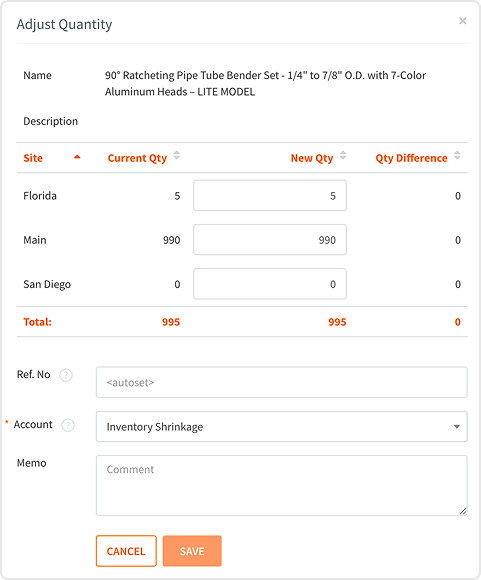
Together, those workflows help teams adjust inventory without turning every discrepancy into an untraceable shortcut.
Explore: How to take products into and out of inventory in HandiFox Online.
Try both inventory adjustment methods in one system
Start a free trial or request a live demo to see how HandiFox helps growing teams manage inventory adjustments with barcode-driven counting, controlled manual edits, and clearer adjustment tracking.