Hot July Sale: Up to 35% Off HandiFox Online and HandiFox Deskop →

Online inventory software built around your workflow

HandiFox Online helps growing businesses track stock, verify items by barcode, fulfill orders faster, and keep QuickBooks Online updated automatically.
cloud based inventory management system

When spreadsheets can’t keep up, but ERP feels like too much

When inventory counts don’t match, orders go out with errors, and QuickBooks Online is always one step behind, you don’t need more manual work. You need real inventory control.

Inventory counts don’t match

Manual updates drift away from what’s actually in stock, and you usually find out when an order can’t be shipped.

Errors reach the customer

Manual updates drift away from what’s actually in stock, and you usually find out when an order can’t be shipped.

There’s no single
source of truth

Manual updates drift away from what’s actually in stock, and you usually find out when an order can’t be shipped.

Less work for everyone

automated online inventory management
Delegate routine to technology
Hand over repetitive tasks, freeing up time for evaluating the bigger picture or diving into specific transactions from anywhere, at any time. Get some more breathing room and use the shortcuts to reduce workload.
warehouse inventory
Data-driven decision making
Automated purchasing suggestions, detailed reports, future inventory needs predictions - HandiFox figures it all out so you don’t have to. This data can be easily shared across teams and acted upon promptly.
cloud data security
Your data is secure, yet always available and up-to-date
You can limit access to sensitive information by tweaking user settings and determining who is authorized to see what. All the user activities are tracked and logged to ensure you can get to the bottom of inconsistencies.
inventory app
Save big on labor costs thanks to automation
Spreadsheets take too long to fill out, keep in order, and analyze. These are man/hours you can eliminate or put to better use by letting HandiFox Online do all the number-crunching, record-keeping, and updating in real-time.

HandiFox Online Features

Inventory Tracking

Get a live look at how much of the product is stored at any given location. Receive, count, transfer, and sell products in multiple units of measure
Learn more

Multiple locations

Track and manage inventory spread across multiple geographically distributed locations. Automate stock transfers between warehouses and set up individual reordering processes.
Learn more

Barcoding

Scan inventory in and out while receiving, counting, transferring, picking/packing, and selling products.
Learn more

Purchasing based on analytics

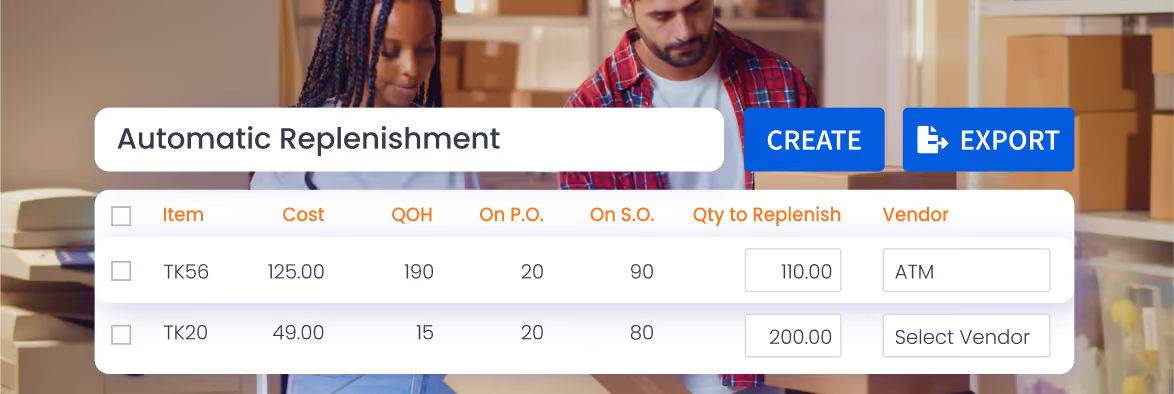
Generate and receive purchase orders from a mobile device. Replenish based on sales analytics and current inventory levels.
Learn more

Picking and Packing

Catch errors before orders leave the warehouse. Make sure the right items are shipped through barcode-enabled picking/packing.
Learn more

Sales

Set up price levels and automate promos. Sell in the field – take and process orders, generate invoices, credit memos, and document payments.
Learn more

Serial, lot, and expiration date tracking

Enable tracking by serial/lot/expiration date to get a deeper understanding of your current inventory, eliminate spoilage, facilitate recalls, and prepare for regulatory audits
Learn more

Integrations

Sync your day-to-day business transactions with QuickBooks Online™.
Learn more

Mobile App

Extend your operations to anywhere outside the office by using the HandiFox Online inventory app on your Android and iOS devices.
Learn more

Inventory workflows that move with your team

HandiFox Online’s cloud inventory software gives your team mobile access to inventory workflows wherever work happens.

Scan and update inventory on the go

Use a smartphone or handheld scanner to receive stock, count inventory, transfer items, and verify products by barcode.

Reduce manual entry and end-of-day catch-up

Record inventory activity as it happens instead of relying on paper notes, spreadsheets, or delayed updates.

Fulfill orders without extra paperwork

Pick, pack, sell, and update QuickBooks Online from the same mobile workflow your team uses to move inventory.

Save warehouse space with dropshipping inventory management

Delegate storage and order fulfillment to your suppliers/manufacturers while staying in the loop of your customer orders 24/7 with HandiFox Online.

Jumpstart with AI in inventory management automation

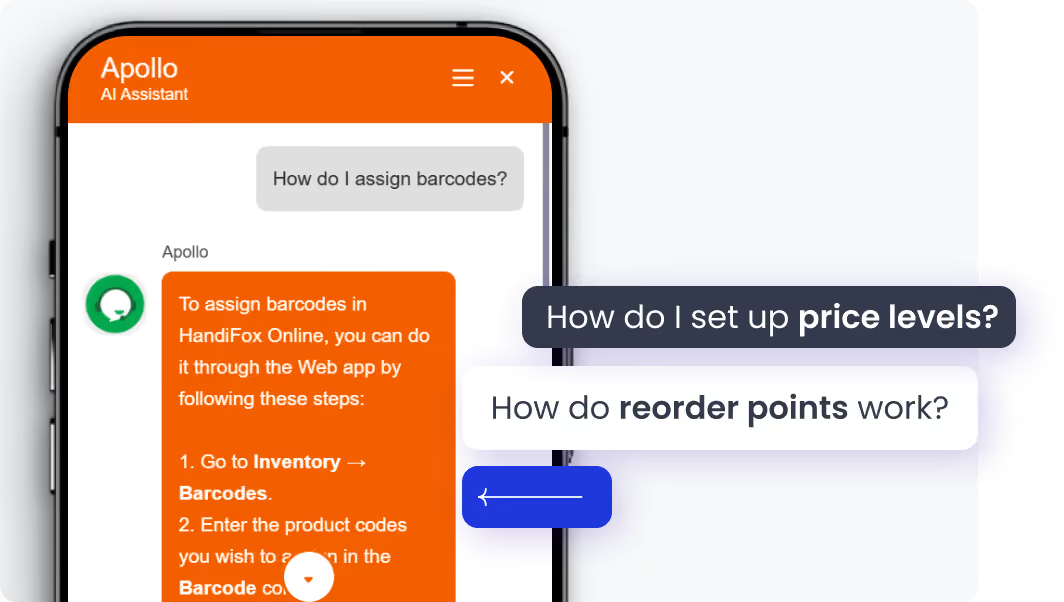
Get help without leaving HandiFox. The built-in AI assistant helps you find answers to setup and workflow questions in plain language, right inside the app.
Instant onboarding support
Real-time task guidance
Fewer errors, faster execution
No manuals. No guesswork. Just answers.

Finally, inventory software that adapts to you

The difference HandiFox Online makes

99%

order accuracy

4x

faster warehouse processes

4.9/5

on QuickBooks App Store

Easy Mile Fitness – scaling from 8 to 53 locations with HandiFox

HandiFox has significantly improved our ability to manage inventory across multiple regions. Its remote audit and monitoring capabilities allow us to oversee all locations in real time.

Sashayma Varela

Easy Mile Fitness

The challenge

Easy Mile Fitness had outgrown spreadsheets and needed a way to centralize inventory control, standardize purchasing, and manage stock across a growing network of clubs.

The result
  • Scaled from 8 to 53 locations
  • Since 2019 on Handifox
With Handifox

Centralized inventory management, real-time visibility and control across locations, standardized ordering workflows, and flexible setup for different vendors, regions, and item lists.

Real inventory results from HandiFox Online users

Co-Founder Earth Perfection
Lisa M
(Ohio, USA)
“Handifox is the best app that we use for our business and we have recommended it to our friends. The system is extremely easy to use and it integrates completely and accurately into QuickBooks. It's so consistent that I barely have to touch the system, except when I print barcodes (time saver!!!).”
CEO Star Building Services
Angelica Catano
(Ohio, USA)
“It has been a wonderful experience with HandiFox since the beginning with the purchasing process, the onboarding and the continued support for our daily processing.”
VP Ultra AC Solutions
Keily Armas
(Ohio, USA)
“Handifox has been a great software for us. Support staff have always been available and quick to respond. They are always willing to work with me on custom requests tailored to our specific needs.”

Your data stays protected

Encryption, role-based access, and automatic backups help keep your business data secure, and always under your control.

Premium EV SSL certificate by GoDaddy

Role-based access

Daily backups

Annual security review by Intuit

Extend QuickBooks Online beyond basic inventory

QuickBooks Online keeps your accounting in order. HandiFox adds the inventory workflows it was never built to handle at scale.

QuickBooks Online

Basic item tracking
Manual inventory counts
No built-in barcode scanning
Limited multi-location control

QuickBooks Online + HandiFox

Barcode-driven inventory workflows
Warehouses, sites, and service trucks
Serial, lot, and expiration date tracking
Order fulfillment
Units of measure
Real-time inventory and accounting sync, and more

Moving your cloud inventory is easier than it seems

Connect to your QuickBooks Online company file and sync your items, vendors, and customers in minutes, or import them from a spreadsheet.

01

Sync with QuickBooks Online or import items, vendors, etc. from a spreadsheet

02

Launch with guided setup - book a free training session.

03

Start working. Most teams are up and running in about 2-3 weeks.

FAQ

1. How long does it take to set up HandiFox Online?
Syncing HandiFox Online with QuickBooks Online takes a few minutes. Once items, vendors, and customers are synced you can start your first transaction (a transfer, purchase order, sales order, etc ). Most teams are up and running in about 2–3 weeks, depending on how extensively they’ve been testing and getting used to the system. You can book a guided training session to help your team get started.
2. Can I import my current stock data?
Yes. You can either sync with QuickBooks Online or, alternatively, import inventory data from spreadsheets, including item lists and starting quantities, so you don’t have to rebuild everything manually.
3. Does HandiFox replace QuickBooks Online?
No. HandiFox Online is cloud inventory management software that works with QuickBooks Online. QuickBooks handles accounting, while HandiFox adds the inventory workflows QuickBooks was not built to handle at scale, including barcode scanning, multi-location inventory, mobile workflows, receiving, picking, packing, and real-time stock movements.
4. Do I need special barcode scanning equipment?
Not necessarily. Your team can use Android or iOS mobile devices for everyday inventory workflows. For higher-volume warehouse operations, HandiFox also supports compatible handheld scanners.
5. What support is included?
HandiFox customers get access to onboarding help, product support, training resources, and guided setup options. You can also book a live demo or training session to walk through your workflows with the HandiFox team.
6. Can I cancel at any time?
Yes. Monthly HandiFox Online subscriptions can be canceled when needed, so you are not locked into a long-term contract.

Ready to get inventory under control?

Get started in minutes, book a quick live demo or call + 1 877 942  6343

Sizzling July savings!
Get up to 35% off HandiFox Online and HandiFox Desktop.
Save now