.svg)





.png)
Key takeaways
- AI can build inventory software quickly, but running it reliably is a much bigger challenge.
- The real cost of custom software includes testing, security, hosting, integrations, and ongoing maintenance—not just AI usage.
- Production inventory systems require proven workflows for purchasing, barcode scanning, inventory control, and accounting.
- Building gives you flexibility, while buying offers faster deployment and more predictable long-term ownership.
- Choose the approach that fits your business: build for unique tools, buy for mission-critical inventory operations.
Claude Code can build an inventory app in a weekend.
At least, that's what it often feels like.
A business owner can describe an inventory application in plain English and use Claude Code or another AI coding agent to generate a database, product screens, stock adjustments, reports, and even tests. What previously required a development team can now begin with one employee, an AI subscription, and a few days of work.
It's no surprise that online communities like Reddit are full of people building internal tools and even complete SaaS products with AI.
.png)
But our own research suggests businesses remain cautious about trusting AI with mission-critical operations. In the HandiFox Small Business Outlook 2026, we surveyed 50 U.S. small businesses about AI in inventory management. While 53% said they would trust AI to recommend inventory actions with human approval and 24% would use it for insights only, just 6% said they would trust AI to make inventory decisions autonomously.
That raises a practical question: If AI can build inventory software, does it still make sense to buy it?
For a simple prototype, the answer may be no. Claude Code can read a codebase, edit files, generate features, run commands, and even test its own work.
But generating an application isn't the same as operating reliable inventory software. Once your application becomes the system of record for inventory, purchasing, customer orders, serial numbers, and accounting, the comparison changes dramatically.
In this guide, we'll compare the real costs of building an inventory app with AI, including Claude Code pricing, developer time, infrastructure, security, testing, and long-term ownership - so you can decide which approach makes the most sense for your business.
What Builders Are Actually Talking About
As AI coding assistants have become more capable, online communities like r/ClaudeCode, r/vibecoding, r/ClaudeAI, and r/InventoryManagement have turned into places where developers and business owners share their experiences building applications with AI.
These discussions are anecdotal rather than scientific research, but many of the same themes appear repeatedly. While success stories are common, so are conversations about testing, debugging, maintenance, and the realities of turning a working prototype into production software.
AI excels at building the first version
One of the clearest patterns is how quickly AI can generate a working application.
Developers regularly share examples of building dashboards, internal tools, SaaS products, and inventory applications in hours or days instead of weeks. Claude Code is particularly effective at generating familiar application components, including:
- product and inventory databases;
- forms for adding and editing records;
- search and filtering;
- reports and dashboards;
- database connections and APIs;
- authentication; and
- barcode input.
This creates a powerful first impression. A functional application can appear remarkably quickly, making the project feel close to completion.
The shift from "Can AI build it?" to "Can I trust it?"
Once the first version is working, the discussion usually changes.
Instead of asking how to generate more features, builders start asking questions such as:
- How do I know the AI didn't introduce subtle bugs?
- How should I test the application before other people start using it?
- How do I review thousands of lines of generated code?
- What happens if Claude refactors something that was already working?
- How do I debug code I didn't write?
Rather than commenting on the interface, experienced developers encourage creators to focus on testing and functional reliability before polishing the UI.
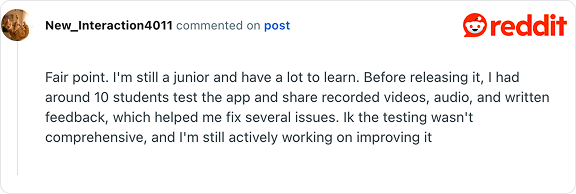
That distinction is especially important for inventory software.
Unlike many business applications, inventory systems become the system of record for purchasing, fulfillment, invoicing, and accounting. A workflow that appears successful during a demonstration can still fail during everyday operations when:
- two employees update the same SKU simultaneously;
- a purchase order is partially received and later edited;
- a mobile device temporarily loses its network connection;
- inventory is transferred while another employee is performing a stock count;
- a serial-numbered item is returned;
- an API updates one system but fails before updating another; or
- a user lacks permission to modify inventory in a specific warehouse, etc.
AI still needs someone to review the code
Another recurring topic is code ownership.
Some builders openly describe themselves as "vibe coders," relying on AI to generate most of the application and reviewing only the visible results. Others argue that this is precisely where human expertise remains essential, emphasizing code review, testing, and validation before trusting AI-generated software in production.
That distinction matters because a business can have a working application without knowing:
- how authentication is implemented;
- whether user permissions correctly restrict access;
- whether inventory transactions are atomic and can't corrupt stock balances;
- whether credentials and API keys are stored securely;
- whether backups can actually be restored;
- which dependencies contain known vulnerabilities; or
- how the application behaves under heavier workloads.
AI can generate code remarkably well, but someone still needs to determine whether that code is secure, maintainable, and aligned with the business's operational requirements.
"Almost finished" often isn't
Perhaps the most consistent theme across AI-building discussions is the gap between a working prototype and production software.
Many builders describe reaching a point where the application appears complete, only to discover that deployment, authentication, permissions, logging, monitoring, backups, documentation, infrastructure, security, and long-term maintenance require significantly more effort than expected.
This reply in r/InventoryManagement summarizes this trade-off particularly well:
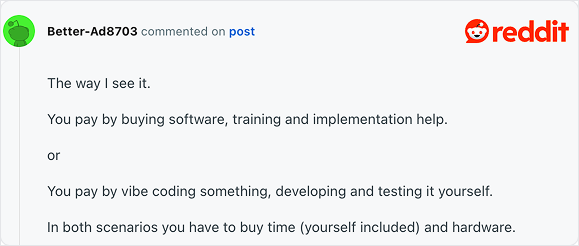
That observation captures the central trade-off behind building inventory software with AI.
AI can dramatically reduce the effort required to generate code. It doesn't eliminate the engineering work required to turn that code into reliable business software, or the ongoing responsibility of maintaining it after launch.
What Counts as a Finished Inventory App?
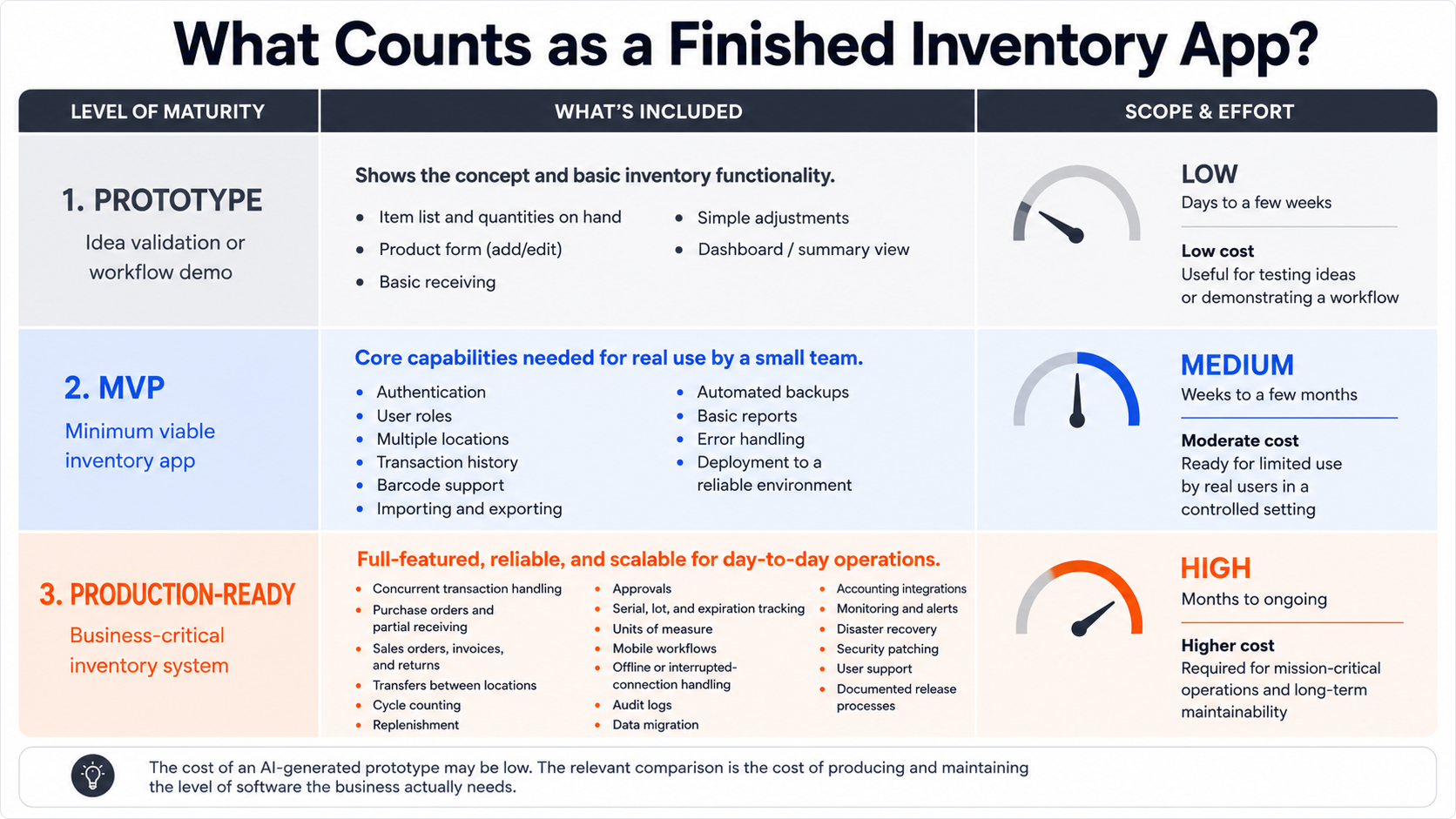
A prototype is not equivalent to established inventory management software simply because both can display a quantity on hand.
A prototype can be useful for validating an idea or may demonstrate an item list, stock quantities, a product form, basic receiving, simple adjustments, and a dashboard.
It can be useful for validating an idea or demonstrating a proposed workflow.
The MVP (minimum viable product) version of an inventory app usually needs more:
- authentication;
- user roles;
- multiple locations;
- transaction history;
- barcode support;
- importing and exporting;
- automated backups;
- basic reports;
- error handling; and
- deployment to a reliable environment.
Once the application becomes essential to operations, requirements expand again:
- concurrent transaction handling;
- purchase orders and partial receiving;
- sales orders, invoices, and returns;
- transfers between locations;
- cycle counting;
- replenishment;
- approvals;
- serial, lot, and expiration tracking;
- units of measure;
- mobile workflows;
- offline or interrupted-connection handling;
- audit logs;
- data migration;
- accounting integrations;
- monitoring;
- disaster recovery;
- security patching;
- user support; and
- documented release processes.
The cost of an AI-generated prototype may be low. The relevant comparison, however, is the cost of producing and maintaining the level of software the business actually needs.
How Much Does Claude Code Cost?
Claude Code can be used through a Claude subscription or through token-based API billing.
Anthropic says usage varies according to project complexity, codebase size, conversation length, model selection, and settings such as auto-accept. Actual capacity varies because a prompt that reads and modifies a large codebase can consume much more context than a small request.
For API users, Claude is priced by input and output tokens. As of July 2026, Claude Sonnet 5 has introductory pricing of $2 per million input tokens and $10 per million output tokens through August 31, 2026. Anthropic says the standard price will then become $3 per million input tokens and $15 per million output tokens.
Token use can rise quickly because an agent may repeatedly read:
- application code;
- database schemas;
- configuration files;
- logs;
- API documentation;
- tests;
- previous conversation context; and
- command output.
Anthropic notes that costs scale with context size and recommends clearing unrelated context, limiting large instruction files, selecting cheaper models where appropriate, and stopping an agent early if it takes the wrong approach.
Across enterprise Claude Code deployments, Anthropic reports an average of approximately $13 per developer per active day and $150–$250 per developer per month, with 90% of users remaining below $30 per active day.
Those numbers provide a useful budgeting baseline, but they are not an estimate of the total cost of developing an inventory application.
AI Tokens Aren’t the Largest Cost
Suppose an employee uses Claude Code intensively for three months and incurs $250 per month in AI usage.
The direct Claude Code cost would be: $250 × 3 months = $750
That can sound inexpensive compared with hiring a software company.
But the calculation excludes the employee’s time. The U.S. Bureau of Labor Statistics reported a May 2025 mean annual wage of $148,100, or $71.20 per hour, for software developers. The corresponding mean for software quality assurance analysts and testers was $111,490. These figures exclude employer taxes, benefits, management, equipment, and overhead.
Using the developer wage as a simple labor benchmark:
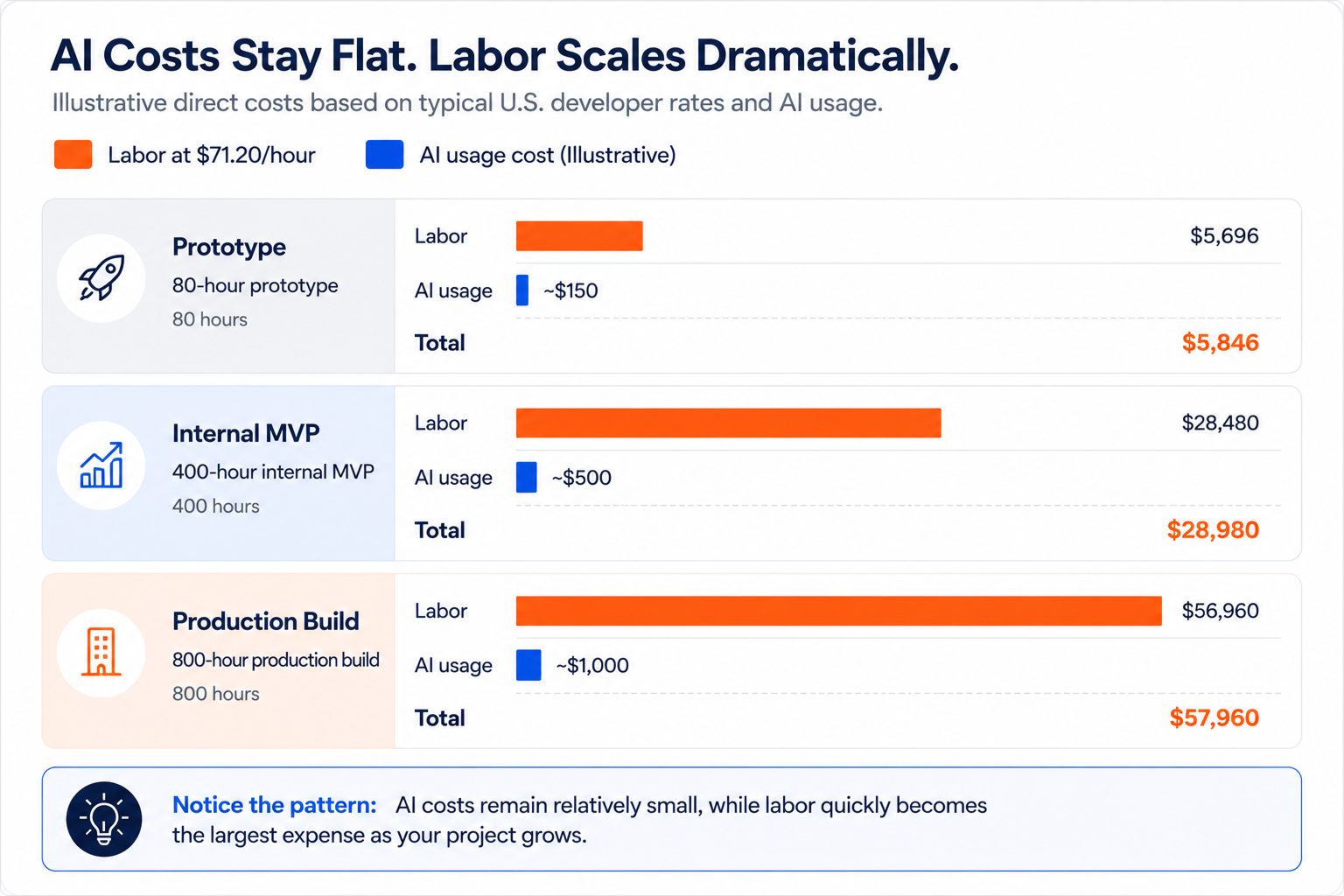
These are illustrative scenarios, not software-development quotes. A nontechnical employee may cost less per hour but need considerably more time. A contractor or senior architect may cost more. The table also excludes testing, hosting, security, integrations, mobile development, data migration, and maintenance.
The important observation is that AI usage can represent only a small percentage of total custom software cost.
Inventory Logic
A basic inventory application records additions and deductions. A dependable inventory system must preserve the correctness of every transaction that affects stock.
Consider a purchase order for 100 units:
- Forty units arrive.
- Ten are damaged.
- Thirty are accepted into one location.
- The remaining units stay open on the purchase order.
- Five accepted units are transferred to another location.
- Two are sold.
- One is returned.
- The supplier later replaces the damaged units.
The system must preserve the purchase order balance, quantities by location, transaction history, item cost, return status, and accounting impact.
AI can help write that logic, but it cannot decide the company’s business rules without clear requirements. It also cannot guarantee that generated code handles every combination correctly.
Common inventory requirements that expand a custom project include:
- negative-inventory rules;
- partial receiving;
- backorders;
- substitutions;
- kits and assemblies;
- multiple units of measure;
- serial and lot numbers;
- expiration dates;
- stock reservations;
- bin locations;
- transfer approvals;
- barcode label generation;
- duplicate-scan prevention;
- inventory valuation;
- returns;
- landed costs;
- cycle counts; and
- accounting synchronization.
An established inventory software company has normally developed these workflows over many releases and customer implementations. An in-house team must define, build, test, document, and maintain them independently.
Before you build, see what's already built
HandiFox Online already covers barcoding, purchasing, sales orders, and QuickBooks sync. Compare it with your build plan in a live demo.
Hidden Costs of Running Your Own Inventory Software
Generating an inventory application is only part of the project. Once employees begin relying on it every day, the application becomes production software—and production software carries ongoing operational responsibilities that extend well beyond writing code.
Many of these responsibilities are easy to underestimate because they don't become obvious until the first version has already been deployed.
Infrastructure
Someone has to host the application, manage the database, monitor system health, and keep the service available.
Even a relatively small internal application typically depends on:
- application hosting;
- a managed database;
- object storage;
- monitoring and logging;
- email delivery;
- domains and DNS; and
- backup infrastructure.
AWS, for example, prices many of these services separately. Amazon RDS is billed independently from application hosting, Amazon S3 charges for storage usage, AWS Backup charges based on the amount of backup storage consumed, and Amazon CloudWatch incurs additional monitoring costs. The exact monthly cost depends on traffic, storage requirements, redundancy, and backup retention policies.
If you're estimating the cost of your own deployment, AWS provides a free AWS Pricing Calculator to model different infrastructure configurations.
.png)
Infrastructure itself is only part of the total cost. Production systems also require someone to monitor alerts, investigate failures, apply security updates, rotate credentials, verify that backups can be restored, and keep dependencies up to date. Those operational responsibilities continue for as long as the software remains in use.
Security and Backups
Running inventory software means protecting business-critical data as well as recovering it when something goes wrong.
A production system requires decisions about:
- backup frequency;
- retention policies;
- encryption;
- access controls;
- disaster recovery;
- restore testing; and
- user authentication.
A free TLS certificate from Let's Encrypt secures data in transit, but it doesn't protect databases, API keys, application permissions, or business logic. Likewise, automated backups only become valuable if they can actually be restored during an outage.
Security therefore becomes an ongoing operational responsibility rather than a one-time setup task.
Testing
A successful demonstration doesn't prove that an inventory application is reliable. Production software must also behave correctly when things go wrong. Testing should cover:
- inventory calculations;
- concurrent transactions;
- permission rules;
- imports and data migration;
- barcode scanning;
- mobile devices;
- interrupted connections;
- accounting integrations;
- browser compatibility; and
- backup restoration.
AI can generate test cases, but someone still has to define what "correct" looks like for the business.
Integrations
Inventory rarely operates in isolation.
Many businesses eventually connect their inventory system with:
- QuickBooks;
- ecommerce platforms;
- shipping carriers;
- payment processors;
- barcode scanners;
- label printers;
- supplier systems; and
- customer portals.
Building an integration is only the beginning. APIs change, authentication methods evolve, and external platforms introduce new versions that require ongoing maintenance. Every integration becomes another system the business must monitor and support.
Maintenance
Custom software becomes a permanent business responsibility. After launch, someone must:
- investigate user problems;
- repair bugs;
- update dependencies;
- apply security patches;
- monitor failures;
- renew or automate certificates;
- update integrations;
- adjust workflows;
- support new devices;
- manage user access;
- review backups;
- document changes; and
- deploy new versions.
Even a modest maintenance allocation of 10–30 developer hours per month represents approximately $712–$2,136 in monthly labor using the BLS wage benchmark, before infrastructure and AI usage.
Over three years, that equals approximately $25,632–$76,896 in maintenance labor.
It also creates a continuity risk. If the person who understands the application leaves, the business inherits the code but not necessarily the knowledge required to maintain it.
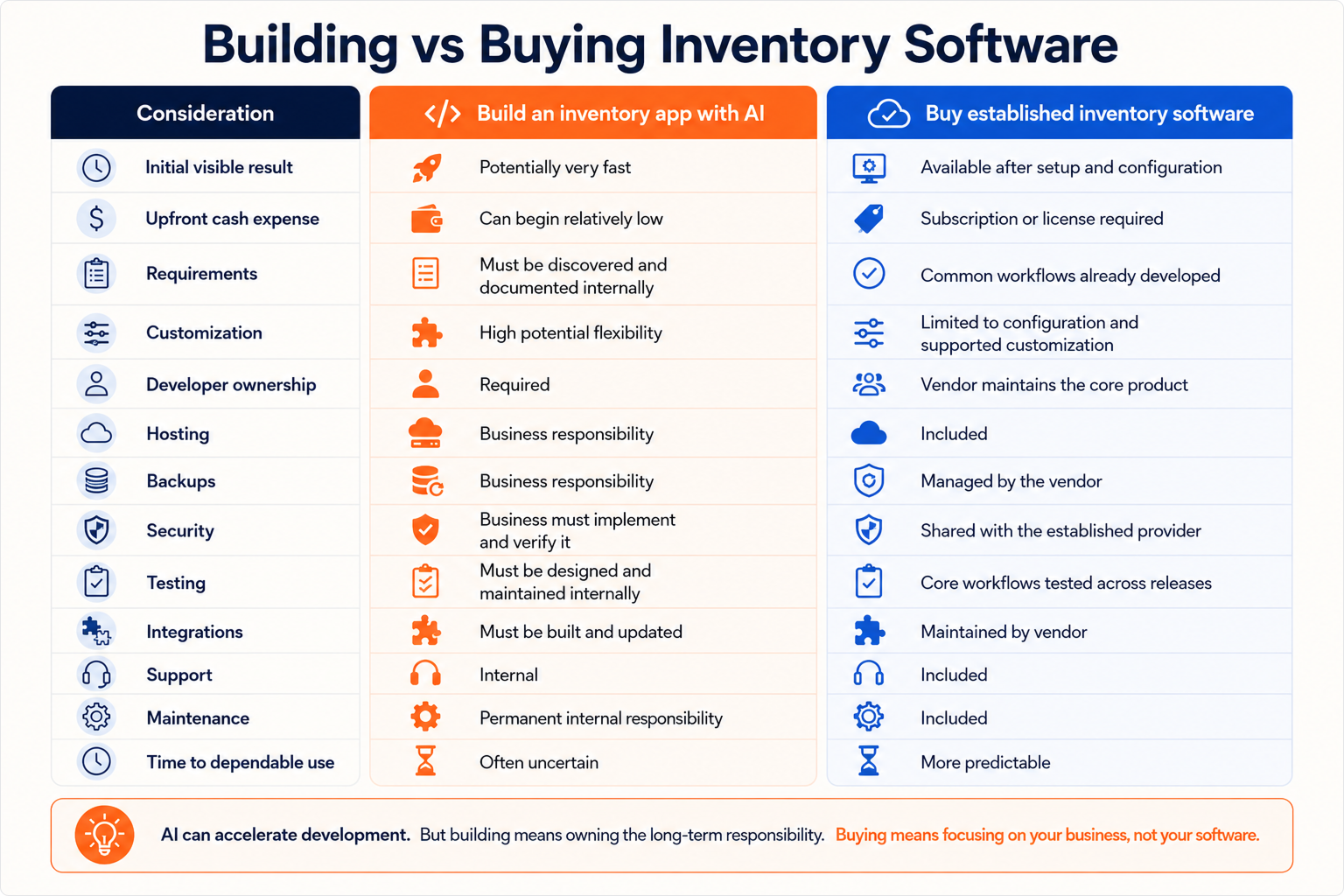
Building vs Buying Inventory Software
AI can help you build a working inventory application surprisingly quickly. For a prototype or a specialized internal tool, it may be possible to get results with a relatively small upfront investment.
The difference appears after the first version is finished. Building your own software means defining business requirements, testing workflows, hosting the application, securing it, maintaining integrations, and supporting it over time. Those responsibilities remain with your business for as long as the software is in use.
Established inventory software takes a different approach. Instead of building core functionality from scratch, you're adopting workflows that have already been developed, tested, and refined across many customers. Hosting, backups, ongoing maintenance, and product updates are typically included as part of the service.
Custom development offers greater flexibility, but it also comes with long-term ownership. Buying inventory software generally provides a more predictable path to deployment and ongoing operation, especially for businesses that depend on inventory accuracy every day.
When Building an Inventory App Makes Sense
Building can be reasonable when:
- the required tool is narrow and noncritical;
- the workflow is genuinely unique;
- no established product supports it;
- the company already has software-development expertise;
- the business expects to maintain the software permanently;
- the application does not control accounting or valuable inventory; or
- the prototype is being used to validate a process before purchasing or commissioning a larger system.
An AI-built tool can also work well as an extension around established inventory software - for example, a specialized dashboard, internal calculator, data transformation utility, or workflow-specific interface.
In those cases, the custom component does not need to replace the system of record.
When Buying Inventory Software Is Safer
Established inventory management software is usually the more predictable choice when:
- inventory accuracy affects revenue or accounting;
- several employees update inventory;
- multiple warehouses, trucks, or sites are involved;
- barcode scanning is required;
- the business needs purchasing and order fulfillment;
- serial or lot traceability matters;
- mobile workflows are essential;
- the system must integrate with QuickBooks or other platforms;
- downtime would interrupt operations;
- no internal developer can own the application; or
- the company needs to go live quickly.
The subscription may appear more expensive than an AI plan but that is the wrong comparison. The relevant comparison is the software subscription against the combined cost of labor, AI usage, hosting, backups, security, testing, integrations, maintenance, and operational risk.
Ask These Questions Before Building
Before deciding to build an inventory app with AI, answer the following:
- Who will review and approve the generated code?
- Who defines the inventory rules?
- Who tests simultaneous transactions and failure scenarios?
- Where will the application and database be hosted?
- How frequently will data be backed up?
- When will restoration be tested?
- Who monitors security vulnerabilities?
- Who updates third-party integrations?
- What happens when the original builder leaves?
- How much employee time can the business allocate every month?
- What does one hour of inventory downtime cost?
- Can an existing inventory platform meet 80%–90% of the need through configuration?
If those questions do not have clear owners and budgets, the application is not inexpensive.
Ready to Compare Your Options?
Claude Code can make inventory app development faster. It can help generate screens, database queries, tests, integrations, and documentation. For technically capable teams, that is a meaningful change.
But faster code generation does not remove software ownership.
A business that builds its own inventory management app is choosing to become responsible for a small software product. That includes not only writing the first version but also securing, hosting, backing up, testing, supporting, and improving it for as long as the business depends on it.
If you're evaluating whether to build your own inventory application or implement an established inventory management system, start by defining the workflows your business actually needs.
Before committing months to building your own inventory application, compare it with software that's already been tested across purchasing, barcode scanning, inventory control, sales, fulfillment, and QuickBooks integration. Start your free trial.