.svg)





Negative inventory happens when your system shows less than zero stock on hand - usually because sales, receipts, transfers, or adjustments were recorded out of sequence. Here’s how it affects COGS and inventory reporting, what causes it, and how to fix it correctly.
Key takeaways
- Negative inventory occurs when the recorded quantity on hand falls below zero.
- It does not always mean you physically sold stock you did not have. Missing, late, or incorrectly entered transactions can produce the same result.
- Negative inventory can temporarily distort inventory value and COGS, particularly when a sale is recorded before the system knows the actual cost of the units sold.
- Negative inventory does not itself mean your business has negative cash flow, but inaccurate inventory records can affect the inventory and profit figures used in financial reporting.
- The right fix is to identify the transaction that caused the quantity to fall below zero and correct the underlying sequence or quantity — not simply add enough stock to make the current balance positive.
Negative inventory means your inventory system shows a quantity on hand below zero. For example, if your records say you had 3 units available but 5 were sold, the system may show -2 units on hand.
Sometimes that reflects a real stock shortage. Often, however, it means the timing or sequence of inventory transactions is wrong: a sale was recorded before the corresponding receipt, stock was transferred from the wrong location, a count was incorrect, or a purchase was never posted.
Either way, negative inventory is more than an odd number on an inventory report. It can affect inventory valuation, cost of goods sold (COGS), and gross profit. For businesses using QuickBooks alongside inventory software, it can also be a sign that purchases, receipts, sales, transfers, or adjustments were recorded late or out of sequence.
What is negative inventory?
Negative inventory is a situation where your recorded quantity on hand (QOH) for an item is less than zero.
Suppose your inventory system shows:
For the period between the sale and the receipt, the system reports negative inventory.
That can happen for two very different reasons:
- The business really did sell or use more units than it had available.
- The physical inventory existed, but the transaction that added it to the system had not yet been recorded.
The first is primarily an inventory availability problem; the second is often a data-entry or transaction-timing problem.
A negative inventory example
Consider a small parts distributor that starts the day with:
- 3 filters in stock
- average recorded cost: $20 each
- inventory value: $60
A customer orders 5 filters before the next vendor receipt has been entered.
The sale takes the recorded quantity from: 3 → -2 units
The inventory system now has to account for the cost of five items even though it only had a recorded cost basis for the three units that were on hand.
If the system doesn’t yet know the actual cost of the items sold, it may temporarily use the most recent or average cost it has on record.
At $20 per unit: 5 units × $20 = $100 COGS
Later that afternoon, the missing vendor receipt is entered:
- 10 filters received
- actual cost: $24 each
The two units that were effectively sold while inventory was negative actually cost $24, not the $20 initially assumed.
That $4-per-unit difference means another 2 × $4 = $8 may need to be reflected in COGS when the actual purchase transaction is recorded.
So a transaction that initially appeared to have $100 of COGS ultimately corresponds to $108 of COGS.
This is one reason negative inventory can create confusing changes in profit reports even after the quantity on hand looks normal again.
What does negative inventory mean for your business?
1. It can distort COGS and gross profit
Inventory is an asset until it is sold. When you sell inventory, its cost moves from the inventory asset account to the cost of goods sold.
Normally, the sequence is straightforward: Receive inventory → establish its cost → sell inventory → recognize COGS
Negative inventory can reverse that sequence: Sell inventory → temporarily assign a cost → record the purchase later → correct the cost
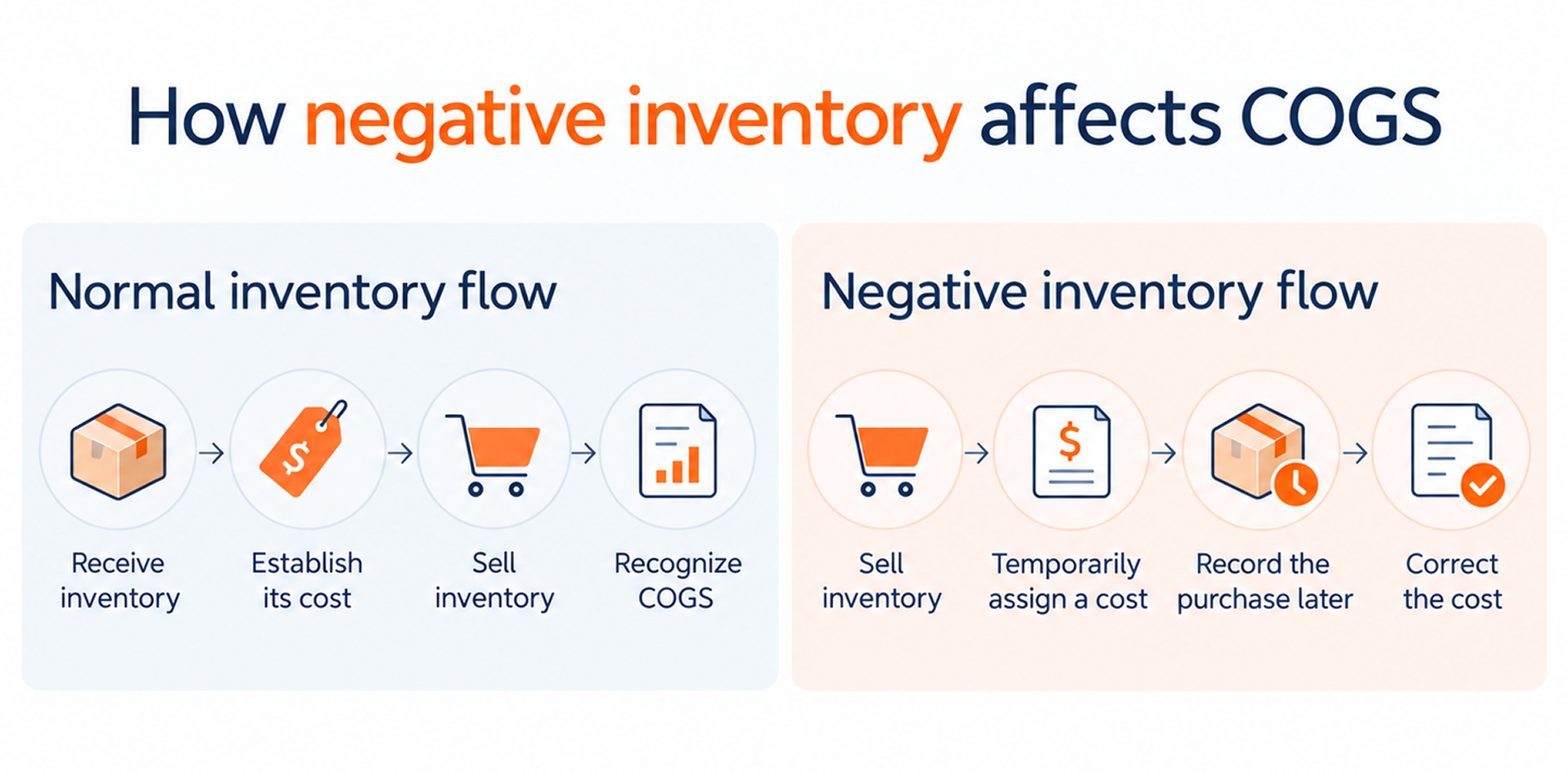
That is what happened in the filter example above. The sale was initially costed at $100, but once the actual $24 purchase cost was recorded, the corresponding COGS became $108.
The important consequence is not the $8 itself. It is that gross profit can change after the sale has already been recorded.
In QuickBooks, selling items before the related purchase is recorded can temporarily throw off COGS and inventory values until the actual cost is entered.
2. It can signal incomplete records, not negative cash flow
Negative inventory does not mean your cash balance is negative. The problem is usually that inventory transactions were recorded late, in the wrong order, or with the wrong quantity.
In the previous example, 10 filters arrive at $24 each, but the purchase hasn’t been recorded yet. You physically have the stock, but your records still don’t show the inventory increase or the amount owed to the vendor.
So negative QOH is not a cash-flow problem by itself. It is a sign that your inventory records may be incomplete or out of sequence, which can affect COGS, inventory value, payables, and financial reports.
3. It can lead to customer availability problems
Negative inventory can also indicate genuine overselling.
If your system says an item is available when it is not physically on the shelf, you may accept orders that cannot be fulfilled on time.
The result can include:
- backorders;
- partial shipments;
- order cancellations;
- expedited replenishment;
- extra freight costs;
- more customer service work.
For repeat B2B buyers, inventory accuracy matters especially because a shortage can affect an entire order rather than a single consumer purchase.
4. It can make replenishment less reliable
Reorder decisions depend on the quantity recorded in your inventory system.
If that number is wrong, purchase recommendations can be wrong too.
A negative balance may trigger unnecessary emergency replenishment. An incorrectly high balance can create the opposite problem and delay a purchase you actually need.
Either way, poor inventory data makes reorder points less useful.
5. It creates extra work
Negative inventory usually has to be investigated transaction by transaction.
Someone may need to:
- recount stock;
- check receiving records;
- compare purchase transactions;
- inspect transfers;
- trace sales;
- review adjustments;
- ask employees when stock physically moved.
Finding the cause early is much easier than trying to reconstruct several months of transactions during a year-end count.
7 common causes of negative inventory
1. Transferring inventory to or from the wrong location
In a multi-location business, the company may have enough inventory overall while one site shows a negative balance.
For example, a user ships 4 units from Warehouse B but records the transfer or sale against Warehouse A, where only 2 units were available.
Warehouse A can fall to -2, even though the company still has enough stock elsewhere.
2. Selling or consuming more than is available
This is the most literal form of negative inventory: an order, invoice, production transaction, or other stock movement removes more inventory than the system says is available.
It may happen because the business knowingly accepts backorders or because the recorded QOH was already inaccurate.
3. Incorrect inventory adjustments
Inventory adjustments are useful for correcting verified discrepancies, but they can also create new ones.
If an employee reduces QOH without documenting why, it may be difficult to determine later whether the difference came from:
- damage;
- shrinkage;
- a counting error;
- an unrecorded transfer;
- an unposted receipt;
- another transaction entirely.
4. Inventory shrinkage found during a count
A cycle count may show that the physical quantity is lower than the system quantity.
If the difference is large enough, correcting the record can push QOH below zero or reveal that previous sales were processed against inventory that wasn't actually there.
The negative quantity is therefore the symptom, and the missing inventory still needs to be investigated.
5. Missing or incomplete purchase transactions
The goods may already be on the shelf even though the inventory system or accounting software has not yet recorded them.
For example: 20 units arrive from a vendor → The warehouse starts selling them → The receipt or bill that increases inventory has not yet been entered → Sales continue reducing recorded QOH → The system eventually goes negative.
6. Transaction timing
A purchase and sale can both be legitimate but entered in the wrong order.
For example: Goods physically arrive Monday → Customer order ships Tuesday → Sale is entered Tuesday → Vendor receipt is not entered until Friday.
Operationally, you had the item but in the system Tuesday through Thursday may show negative inventory.
7. Returns and refunds recorded incorrectly
Returns can create inventory discrepancies when the financial transaction and physical stock movement do not happen together.
For example, issuing a refund does not necessarily mean the returned unit has already reached the warehouse and should be available for resale.
The inventory transaction should reflect what actually happened to the item.
How to fix negative inventory step by step
For example:
The September 5 sale is where QOH first drops below zero. That sale may not be the real problem, though. If the 10 units had already arrived but the receipt was entered late, the negative balance was caused by transaction timing rather than an actual stock shortage.
Examples:
- correct the receiving date if the goods genuinely arrived earlier;
- receive the purchase that was never posted;
- correct the warehouse/site on a transfer;
- fix a duplicate sale;
- correct an erroneous quantity.
If you're using QuickBooks and negative inventory has existed for some time, review the impact with your accountant. Correcting historical negative inventory can affect previous COGS and inventory values.
An adjustment should explain a known inventory difference, not cover up a transaction you haven't investigated.
How to investigate negative inventory in HandiFox Online
1. Find the item with negative QOH
Go to Item List and search for the item with a negative quantity.
You can also sort the Total QOH column from lowest to highest to surface negative quantities.

2. Open the item's transaction history
In the Actions column, select the arrow next to Edit, then choose Transactions.
This opens the Inventory Transactions by Item report.

3. Set the site and date range
Select the relevant Site, Date Range, then click Apply.

4. Find where QOH first became negative
Review the transactions around the first date where QOH dropped below zero.
Look at the sale, receipt, transfer, count, or adjustment immediately before and after that point.
5. Correct the underlying problem
Once you know the cause, correct the relevant transaction or inventory discrepancy rather than simply adding enough stock to return QOH to zero.
How to prevent negative inventory
Fixing negative inventory matters. Preventing the same problem from returning matters more.
1. Record receiving before stock is sold
Make receiving part of the physical warehouse process. If goods have arrived, record the receipt before making those units available for sales or fulfillment.
This keeps both quantity and cost information in the correct sequence.
2. Use barcode scanning for inventory movements
Barcode scanning reduces the need to manually enter item numbers, quantities, locations, and stock movements.
Use it consistently for receiving, transfers, counts, picking, and other inventory transactions where practical.
3. Cycle count throughout the year
A cycle count checks a manageable subset of inventory regularly instead of waiting for one large annual count.
Prioritize fast-moving items, expensive inventory, SKUs with frequent discrepancies, and items that have previously gone negative.
4. Set realistic reorder points
Reorder points help you replenish stock before QOH reaches zero.
They work best when the underlying inventory record is already accurate.
5. Keep inventory transactions in one connected workflow
When staff update QOH independently in several systems, discrepancies become much harder to trace.
For businesses using QuickBooks alongside dedicated inventory software, define which system employees should use for each type of inventory transaction and keep that process consistent.
6. Review transfers between locations
Multi-location inventory can be positive company-wide while individual sites fall below zero.
Make sure transfers record both sides of the movement: stock leaves Site A → stock arrives at Site B
7. Use controls that prevent negative QOH
HandiFox Online includes a setting designed to prevent transactions from taking inventory below zero.
Go to: Settings → Inventory → Don't allow negative QOH values
With the setting enabled, HandiFox warns users and prevents them from saving transactions that would result in negative inventory.

Negative inventory vs. a stockout: what's the difference?
They are related, but they are not the same. A stockout means you physically do not have enough stock to fulfill demand. Negative inventory means your records show quantity on hand below zero. You can have one without the other, or both at the same time.
How HandiFox helps prevent negative inventory
HandiFox helps reduce the transaction gaps that often lead to negative inventory by keeping receiving, sales, transfers, counts, and adjustments in one inventory workflow. HandiFox Online also connects with QuickBooks Online, helping operational inventory activity and accounting records stay aligned.
You can also use HandiFox's negative-QOH control to stop transactions that would take stock below zero, while item transaction history makes it easier to trace where a discrepancy began. Combined with consistent receiving and cycle counts, these controls help prevent negative balances from becoming recurring cleanup work.
Frequently asked questions
Can inventory really be negative?

Does negative inventory mean I've oversold?
How does negative inventory affect COGS?
Does negative inventory mean negative cash flow?
Should I fix negative inventory with an inventory adjustment?
How can I find negative inventory in QuickBooks?