.svg)





Material that leaves your yard stops being counted the moment it hits a truck. Here is how contractors on new builds and renovations keep sites, trucks and the yard in one inventory picture — and close out jobs without write-offs.
.png)
Construction inventory rarely stays in one place. Materials move between the yard, trucks, active sites, and sometimes directly from a supplier to the site.
That makes construction site inventory tracking very different from managing stock in a traditional warehouse. A delivery may never pass through the yard. Leftover materials may move to another site. Stock can remain on a truck for days. If those movements aren't recorded when they happen, the inventory system quickly stops reflecting what's actually available and where.
The goal isn't to track every screw or tube of caulk. It's to keep visibility into the materials that matter most—high-cost items, long-lead materials, theft-prone stock, and products ordered in specific quantities.
This guide covers a practical approach: treating sites and trucks as inventory locations, recording transfers as materials move, using mobile inventory tools where the work happens, and establishing a simple counting routine your crew can realistically maintain.
Why Job-Site Material Tracking Is Harder Than Warehouse Tracking
A warehouse is easier to control because inventory normally enters and leaves through defined processes. Receipts can be checked against purchase orders, stock has known storage areas, and discrepancies can be investigated while the people and materials are still in the same place.
A construction site is more fluid. Deliveries may go directly to the site, materials can be consumed the same day they arrive, and stock may move between crews, trucks, and other active sites. When recording is postponed until the end of the week - or the end of the project - the inventory record is already behind reality.
Three gaps cause many of the problems: direct-ship deliveries that never enter the inventory record, undocumented transfers between locations, and relying on one final count to explain weeks or months of material movement. The fix is not simply asking crews to be more careful. Recording has to happen at practical moments: when a delivery arrives, when stock changes location, and during a regular count.
Treat Sites as Inventory Locations, Not as a Black Hole
A common structural mistake is treating material as gone as soon as it leaves the yard. If a pallet is sitting at a customer site or several boxes are still on Truck 2, the business still owns that inventory. Removing it from stock too early makes the system disagree with what physically exists.
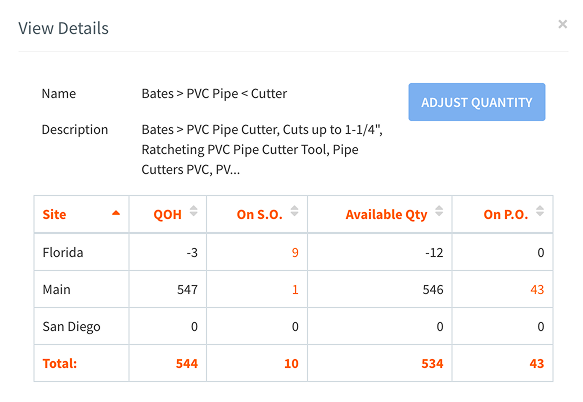
Active sites and stocked trucks can be set up as separate inventory locations when you need visibility into the materials stored there. The yard remains another location. Moving material between them becomes a transfer rather than a disappearance - exactly what tracking inventory across locations is designed to support.
Use a consistent naming scheme for locations and retire temporary site locations when they are no longer needed. Avoid reusing names in a way that makes historical activity difficult to distinguish.
Also keep physical inventory location separate from project accounting. An inventory system should answer where the material physically is - the yard, a truck, or an active site. If your accounting or project-management system assigns material costs to individual projects, that is a separate record from the material's physical location.
Treat every job site as an inventory location
HandiFox tracks materials across the yard, trucks, and job sites and moves them between locations with transfers.
What Materials Are Worth Tracking?
Trying to count every consumable usually creates more work than value. The exact tracked list will vary by trade, but an item is a good candidate for detailed tracking if at least one of these conditions applies:
- It has meaningful unit cost, so a small discrepancy represents real money.
- It is portable and attractive enough to have a higher loss or theft risk.
- Its lead time is long enough that an unexpected shortage can delay work.
- It was ordered in a specific quantity or configuration and is difficult to replace quickly.
For inexpensive consumables such as fasteners, caulk, blades, and tape, minimum stock levels and regular replenishment are often more practical than unit-by-unit counting. The yard itself can still use normal warehouse organization - clear shelves, racks, bins, and labels - so tracked materials are easy to find.
This guide focuses on material inventory rather than employee tool check-in/check-out. HandiFox does not provide employee tool-tracking functionality.
Renovations and Remodels Change What Is Worth Tracking
Renovation and buildout work often has a different inventory profile from a ground-up project. There may be little or no staging space, while the most important materials are client-selected finishes, fixtures, hardware, or products with long lead times.
For contractors evaluating inventory tracking software for renovations, the tracked list may therefore be shorter but more valuable. Direct deliveries are more common, substitutions may not be acceptable, and leftovers matter because the material may still be reusable elsewhere.
The same tracking mechanics still apply: know where the material is, record it when it moves, and count the items where an unexplained shortage would have a real operational or financial impact.
Moving Stock Between the Yard, Trucks and Sites
Once materials are tracked by location, most day-to-day movements fall into four simple workflows.
Receiving into the yard.
Material arrives against a purchase order, is checked, and enters stock at the yard or warehouse location.
Transferring out.
Material moves from the yard to a truck, from a truck to a site, or between other inventory locations. Recording both what was sent and what was received helps surface discrepancies while they can still be investigated.
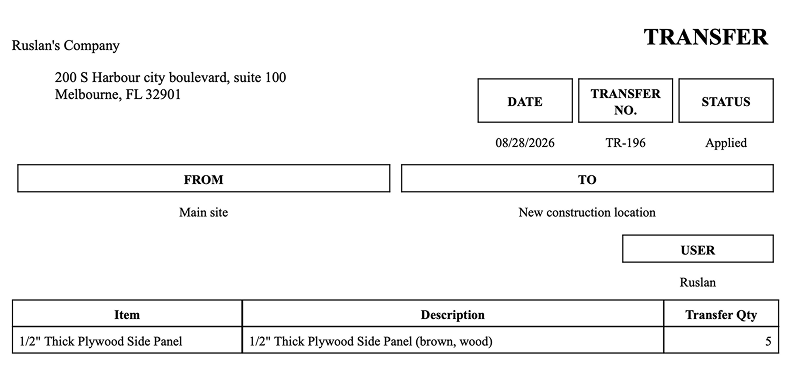
Direct delivery to a site.
When a supplier delivers materials directly to an active site, receive the material into that location rather than leaving it outside the inventory record. This is especially important for high-value or long-lead items that never pass through the yard.
Returning or reallocating leftovers.
Unused material can be transferred back to the yard or to another active location. The return process should be simple enough that crews can record it when the material actually moves, rather than leaving stock assigned to a closed site.
Stocked trucks create the same visibility problem as remote storage locations: if inventory is not recorded by truck, the office may know the company owns an item without knowing where to find it. Treating frequently stocked vehicles as inventory locations makes truck stock visible alongside yard and site inventory.
Who Counts, When, and on What Device?
Counting works best when responsibility is clear. For each site where inventory is being tracked, assign one person - often a crew lead or foreman - to maintain the agreed counting routine.

A practical cadence matters more than counting constantly. Verify direct deliveries when they arrive, count tracked materials on a regular schedule, and perform a final count before the site inventory location is closed. For longer projects, a count at major phase transitions can also be useful.
The device should be the phone or tablet already being used in the field. A mobile inventory app lets the person handling the material record a receipt, transfer, or count where it happens instead of transcribing notes later. Barcode scanning can reduce manual entry further when labels are applied before material leaves the yard.
How to Set Up Construction Site Inventory Tracking
Start with one representative site rather than changing the process across every active project at once. A small pilot makes it easier to see what the crew will actually use and where the workflow needs adjustment.
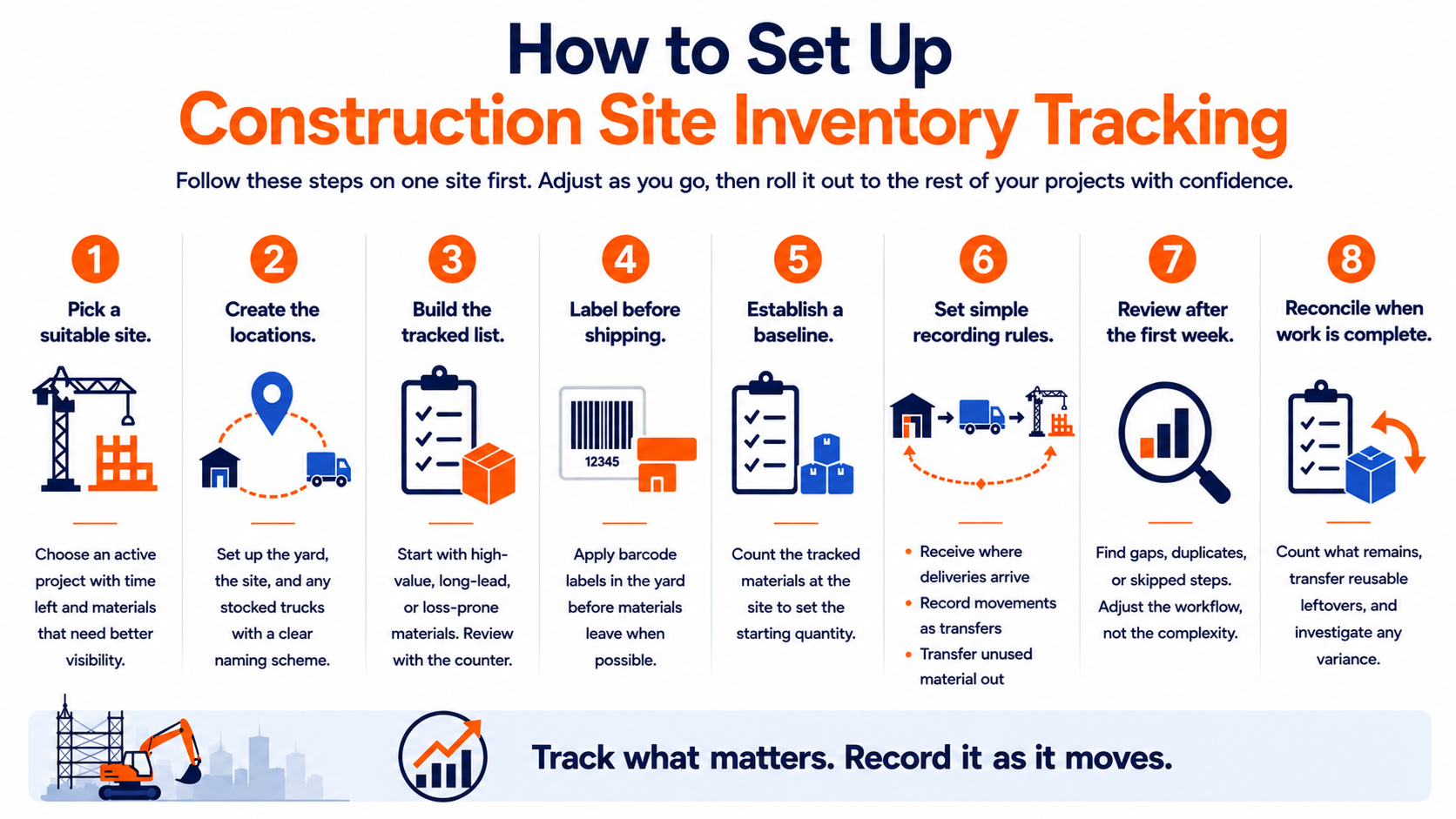
- Pick a suitable site. Choose an active project with enough time left to test the process and materials where better visibility would be useful.
- Create the locations. Set up the yard, the active site, and any stocked trucks involved, using a naming scheme that will remain clear as more locations are added.
- Build the tracked list. Start with a manageable number of high-value, long-lead, or loss-prone materials. Review the list with the person responsible for the count.
- Label before shipping. Apply barcode labels in the yard where possible, rather than relying on crews to label material after it reaches the site.
- Establish a baseline. Count the tracked material already at the site so the system has a starting quantity.
- Set simple recording rules. Receive deliveries into the location where they arrive. Record movements between locations as transfers. Transfer unused material again when it leaves the site.
- Review after the first week. Look for transfers that were not confirmed, duplicated entries, or steps crews consistently skip. Adjust the workflow rather than adding more complexity.
- Reconcile the site inventory when work is complete. Count what remains, transfer reusable leftovers, and investigate any unexplained variance while the people and materials are still available.
Reconcile Inventory When a Site Closes
When work at a site is complete, count the tracked material that remains and transfer usable leftovers back to the yard or another active location. Record damaged or unusable material appropriately, then investigate any remaining difference between the system quantity and the physical count.
The goal is to close the inventory location with as little unexplained variance as possible. Doing this while the crew and materials are still on site makes discrepancies much easier to investigate than waiting weeks after demobilization.
If the same type of variance appears repeatedly, use it to improve the process. A recurring gap on direct deliveries may point to receiving. A repeated truck discrepancy may point to unrecorded transfers. The useful outcome is not simply a smaller adjustment - it is knowing where the record stopped matching the physical movement of material.
Common Construction Inventory Tracking Mistakes
- Removing materials from inventory when they leave the yard. If the material still physically exists at a site or on a truck, record its new location rather than treating it as gone.
- Trying to track every consumable. Focus detailed tracking on materials where cost, lead time, or loss risk justifies the effort.
- Failing to confirm transfers. Recording what was sent and what arrived helps surface discrepancies before close-out.
- Leaving counting responsibility unclear. Assign one person at each tracked site to maintain the agreed routine.
- Using counts to evaluate employees rather than inventory accuracy. The goal is to identify discrepancies and improve the process, not make counting feel punitive.
How Construction Inventory Tracking Works in HandiFox
HandiFox helps contractors keep inventory visible as materials move between the yard, stocked vehicles, and active sites.
In the field
Crews can use the mobile app to receive materials, confirm transfers, perform inventory counts, and record unused stock moving back to another location. Barcode scanning reduces manual entry and lets inventory activity be recorded where the materials are actually handled.
At the yard
Inventory managers can receive purchase orders, print barcode labels, transfer materials to trucks or sites, monitor stock by location, and set replenishment levels for different locations.
In the office
HandiFox provides a current inventory picture across locations while synchronizing inventory activity with QuickBooks Online or QuickBooks Desktop. This is the model behind our inventory software for construction businesses. It makes it easier to answer a basic operational question during a project: do we already have this material, and where is it?
A related example comes from natural stone distribution, where high-value material also moves between storage locations and customer sites. The success story of Tessa Stones shows how the company moved beyond QuickBooks Online alone by adding real-time inventory visibility, barcode scanning, and mobile workflows. The products are different, but the underlying visibility problem is similar: valuable material needs to remain traceable as it moves.
Keep Construction Inventory Visible Wherever It Moves
Construction site inventory tracking does not require counting every item or turning crews into inventory clerks. It requires a reliable way to record the materials that matter as they move between the yard, vehicles, and active sites.
Start with high-value, long-lead, or loss-prone materials. Use inventory locations where they add useful visibility. Record transfers when they happen, receive direct deliveries where they actually arrive, and give one person responsibility for keeping each site's tracked inventory current.
The result is a much clearer answer to two everyday questions: What material do we have, and where is it right now?
HandiFox combines multi-location inventory, mobile workflows, barcode scanning, purchasing, transfers, and QuickBooks integration to help contractors keep that information current without relying on spreadsheets or end-of-project reconciliation.
Explore HandiFox inventory software for construction businesses →