.svg)





Key takeaways
- A lot number identifies a production batch, while an expiration date shows when that batch should no longer be used. Storing both in one field makes it difficult to sort by expiration date or search by lot.
- A recall notice usually identifies specific lots, not just products. If you track quantity by item only, you cannot quickly answer two essential questions: do we still have any of the affected lot, and which customers received it?
- An expiration date usually cannot be determined from the lot number. There is no universal encoding standard, so the date should always be recorded separately rather than inferred.
- FIFO rotates stock by receipt date. Medical inventory with a shelf life should usually rotate by expiration date instead, so a short-dated batch does not remain on the shelf behind newer stock.
- An audit-ready history should be created through everyday transactions. When every receipt, transfer, count, and sale records the affected lot, the trace already exists when an audit or recall occurs.

The same data gap also leads to expired stock. A box received in March may expire before one received in January, so rotation based only on arrival date can send the wrong batch out first.
This guide explains how lot number tracking and expiration date tracking work together for medical supply distributors, group practices, medical offices, and durable medical equipment (DME) suppliers.
Why lot numbers and expiration dates are two different things
A lot number, also called a batch number or lot code, identifies units produced under the same conditions during one production run. If a sterilization cycle fails or a raw material is contaminated, the lot identifies the group of products that may be affected and recalled.
An expiration date indicates how long the manufacturer expects the product to remain usable under the specified storage conditions. It is a property of the lot, but not the same fact: two lots can share an expiration date, and one lot expiration date tells you nothing about the next lot's.
Barcode standards also treat them as separate data elements. In the GS1 system used across healthcare packaging, batch or lot number is carried under Application Identifier (10) as an alphanumeric string of up to 20 characters, while expiration date is carried under AI (17) as exactly six digits in YYMMDD format (GS1 Barcode Syntax Dictionary). Different identifier, different format, different meaning. A serial number, when present, is a third element under AI (21).
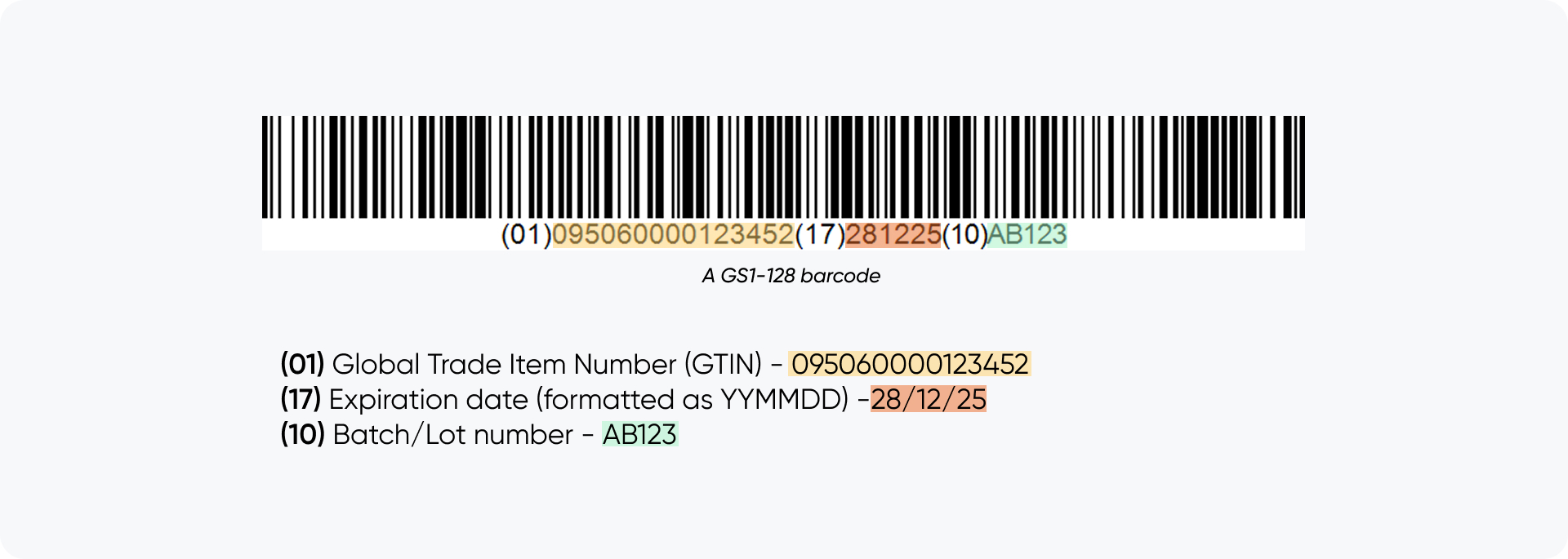
FDA's device rules draw the same line. Under 21 CFR 801.3, a unique device identifier (UDI) splits into a device identifier — the fixed part naming version, model and labeler — and a production identifier, the variable part that may convey the lot or batch, the serial number, the expiration date, or the date of manufacture (21 CFR 801.3).
Item records should therefore use two separate fields: the lot code exactly as printed and the expiration date stored as a date value rather than plain text. Combining both values in a notes field removes the ability to sort reliably by expiration date while searching independently by lot.
What a medical supply recall actually requires from your records
FDA uses the word "recall" when a company takes a correction or a removal to address a device problem that violates FDA law, and classifies the action as Class I, II or III by degree of risk. When a company cannot predict which individual units are affected, it may recall an entire lot, model, or product line (FDA — What is a Medical Device Recall?).
This is why recall notices often identify the affected lot codes. Under 21 CFR 7.49, a recall communication is expected to clearly identify the product, size, lot number(s), code(s) or serial number(s), and to give recipients a ready means of reporting back whether they hold any (21 CFR 7.49). The next steps depend on your role in the supply chain.
As a consignee - such as a distributor, clinic, dispensary, or DME supplier that purchased the product - you must determine whether you hold any affected stock. Quarantine what you hold of the named lots and report back. This may not require filing directly with the FDA, but it does require being able to search your own inventory by lot quickly.
As a manufacturer, importer or labeler, the requirements are explicit. 21 CFR 806.10 requires a written report to FDA within 10 working days of initiating a correction or removal made to reduce a risk to health or remedy a violation that may present a risk to health.
Required contents include the manufacturing lot or serial number, the total number of devices subject to the action, the date of manufacture or distribution with the expiration date or expected life, and the names and addresses of all consignees with the dates and quantities shipped to each (21 CFR 806.10). Unreported actions still have to be recorded and kept for two years beyond the expected life of the device (21 CFR 806.20), and a firm initiating a recall is asked to give FDA its distribution information, including the number of direct accounts (21 CFR 7.46). Together, these fields describe a transaction history tied to specific lot numbers. In practice, traceability depends on whether that history already exists in your records when a recall begins.
For prescription drugs the regime is stricter — the Drug Supply Chain Security Act moves identification and tracing of certain prescription drugs to the package level (FDA — DSCSA). If your catalog mixes devices, disposables and pharmaceuticals, treat the drug lines as their own workflow.
Receiving: capturing lot and expiry at the moment stock arrives
The easiest time to capture lot and expiration data is during receiving, while the packaging and product label are still in front of the employee. After cartons are opened and stock is distributed, reconstructing which lot went to each location becomes far more difficult.
- Scan or key the item against the purchase order line. Inventory that is not received against the purchase order may enter stock without a complete lot history.
- Capture the lot code exactly as printed. If the packaging carries a GS1 barcode, scanning it returns batch/lot and expiry as separately parsed values instead of one retyped string.
- Enter the expiration date in a dedicated date field and verify the format. GS1 encodes YYMMDD, US labels often print MM/DD/YYYY, European suppliers DD/MM/YYYY. For example, 03/04/2027 may mean March 4 or April 3, depending on the supplier's format.
- Split the receipt when one delivery contains several lots. One line per lot, with its own quantity and expiration date.
- Label the physical stock so the lot stays attached to the goods after the carton is opened.
Barcode scanners and printed labels are especially valuable during these steps. Barcode receiving removes the retyping that produces transposed lot codes, and printed labels let a picker confirm the lot on the shelf instead of trusting a shelf tag.
Lot and expiration date tracking is switched on per item, so decide early which SKUs are tracked: sterile single-use disposables, reagents, implants and anything with a shelf life belong in the set; office supplies do not.
Capture lot and expiry at receiving
HandiFox records lots and expiration dates as stock arrives and helps you pick the earliest-expiring units first.
FEFO vs FIFO: why "first in" is the wrong rule for medical stock
FIFO - first in, first out - rotates inventory by receipt date. It can work for nonperishable goods, but it does not account for products that expire because receipt order and expiration order may differ.
For example, a supplier may ship a newer batch in January and an older, shorter-dated batch in March. Under FIFO, the January batch may be issued first while the March batch expires on the shelf.
FEFO - first expired, first out - rotates by expiration date regardless of arrival. For date-sensitive medical stock, FEFO is generally the more appropriate rotation method.
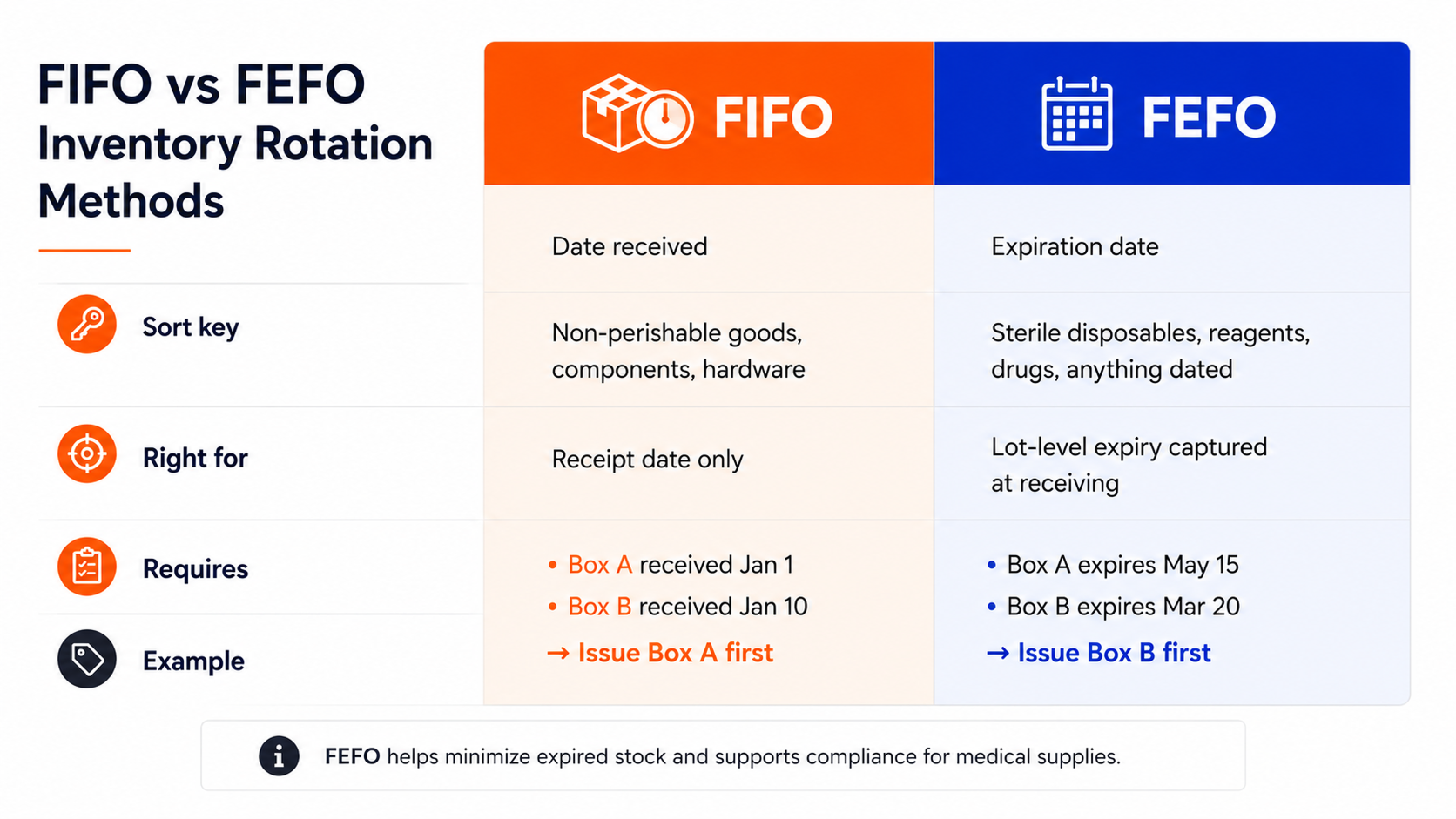
FEFO only works when expiration data is complete and accurate. If expiration dates are missing from some lots, picking recommendations become unreliable and employees may stop trusting them. This is why expiration dates should be required during receiving. Two situations also require separate rules: accounts whose contracts specify minimum remaining shelf life, where FEFO alone hands them the batch that fails a 12-month dating clause; and disposal, where expired stock leaves available quantity through a documented write-off.
Multi-location practices: the same lot in three cabinets
A practice with four treatment rooms, or a distributor with a warehouse plus two vans, has a specific problem: the same lot exists in several places at once, and the total on hand tells you nothing about where it is. This is where spreadsheets often become difficult to maintain.
Quarantining a recalled lot requires locating it in every storage area. That is only possible when records track quantities by both lot and location and when internal movements are recorded as transactions. That turns "we have 60 units of lot 4471" into "22 in the main store, 30 in the Room 3 cabinet, 8 on the van."
Two practices help preserve that visibility. Treat every stocking point as a location — treatment rooms, crash carts, service vans, consignment shelves at a customer site. Record every transfer rather than treating it as an informal restock: a transfer moving a specific lot to Room 3 keeps the trace intact, while a quiet restock to a par level does not.
Building an audit-ready log without extra paperwork
An audit-ready record should not depend on a separate binder or spreadsheet that has to be updated after the fact.
The most reliable log is the system's ordinary transaction history, with one requirement: every transaction touching lot-tracked stock records which lot it touched — receipts, transfers, count adjustments, write-offs, picks and sales. No separate log is required because the lot information remains attached to each movement.
When this information is complete, an auditor or recall coordinator can answer two questions with a direct lookup. Forward trace: here is a lot - where does the remainder sit, and which customers received units? Backward trace: here is a customer or an order - which lots did they get? Forward trace answers a recall; backward trace answers a complaint or an adverse event, which starts from the patient.
The system that stores this history also matters. Accounting software is not usually the right place to manage this level of detail: QuickBooks lot numbers are not a native concept, so the batch detail has nowhere to sit and the trace ends at the invoice. A practical approach is to keep lot, expiration, and location details in the inventory system while posting the financial results of receipts, sales, and write-offs to QuickBooks. This keeps accounting records aligned while preserving a searchable lot history.
Common mistakes that surface only during an audit
- Lot and expiry in one field. It reads fine on screen and makes both expiry sorting and lot search impossible.
- Expiry stored as text. Mar-27, 03/27, 2027-03-31 in one column. Nothing sorts, and FEFO quietly stops working.
- Ambiguous imported dates. MM/DD versus DD/MM on European packaging. Pick a house rule and put it in the receiving instruction.
- Untracked internal moves. The system says warehouse; the goods are in a treatment room drawer.
- Partially tracked catalogs. Some items lot-tracked, some not, with no rule for which. The untracked ones are what you get asked about.
- Expired stock still countable. Expiry has to remove stock from availability, not just flag it.
- Recall notices handled by email only. The shelves are checked and nothing is recorded. Six months later there is no evidence the check happened.
How this works in HandiFox
HandiFox is lot number tracking software that syncs with QuickBooks and carries lot, serial and expiry through receiving, transfers, counts, assemblies, picking and packing, and sales.
On the dock and in the stockroom. Lot and expiry are captured at receiving, and barcode labels can be printed for items being put away, so the lot is confirmed by scan rather than read off a carton. Counts, transfers and picks all record the lot involved.
For whoever manages the stock. Expiration dates are monitored automatically for items tracked by lot or serial, and expired or near-expired stock can be written off explicitly instead of drifting out of the count. Across sites, stock is visible per location and transfers are recorded as transactions — what tracking medical inventory expiration dates across a multi-site group practice requires.
For the owner or compliance lead. The Transactions by Serial/Lot Number report is the trace: it shows the history behind a given lot, which turns a recall notice into a search rather than an investigation.
Flashpoint Medical Systems, an emergency medical supply provider, uses HandiFox lot and expiration tracking alongside barcoding and replenishment workflows.
How Flashpoint Medical Systems streamlined replenishment with HandiFox
How a medical supply provider keeps stock on point and audit-ready.
Read the case study