.svg)





Getting started with HandiFox Online just got easier. You can now explore the software using preloaded sample data, without connecting QuickBooks or entering your own inventory information.
We’ve also expanded bulk item import to companies connected to QuickBooks Online, making it easier to add or update multiple products at once.
Try HandiFox Online with Sample Data
You can now explore HandiFox Online without connecting QuickBooks or entering your own data.
When you first log in, choose from three setup options: connect QuickBooks Online, start with an empty company, or fill your company with sample data.
Select Fill Company with Test Data to populate your account with sample items, vendors, customers, purchase orders, sales orders, invoices, estimates, and tax codes.

This lets you explore inventory and transaction workflows using ready-made examples instead of spending time setting everything up from scratch.

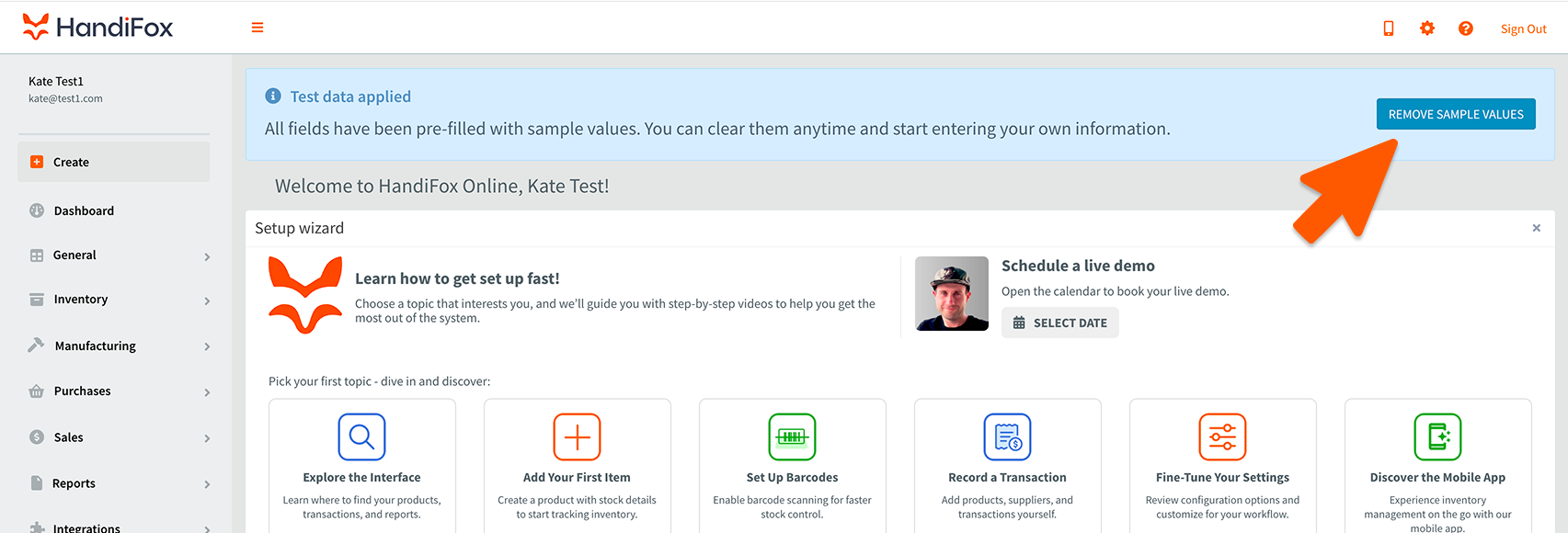
When you’re ready to use your own data, go to the Dashboard and click Remove Sample Values.
Bulk Import Items into QuickBooks-Connected Companies
Previously available only for standalone companies, bulk item import now also works with companies connected to QuickBooks Online.
Instead of adding products individually, you can upload an Excel file to create multiple items at once or update existing item records.
To import items:
1. Prepare your file. Download the sample Excel file and fill in the required fields, highlighted in yellow.
2. Upload your file. Go to Inventory → Item List → Import, select your completed file, and click Next.


3. Choose an import option. Add new items or update existing ones by Item Name or SKU. When updating, you can choose to preserve existing values if the corresponding fields in your file are empty.

4. Review field mappings. Make sure the columns in your file match the corresponding fields in HandiFox.

5. Check for errors and import. If any rows are flagged, click the ! icon to view the details and correct the errors. Once everything looks good, click Import.

Follow the Item Import Guide for detailed instructions on preparing your file and completing the import.
Get Started with the Latest Updates
Whether you’re evaluating HandiFox Online or managing inventory with QuickBooks Online, these updates make it easier to get started and maintain your item records.
Try the new sample data option when setting up a company, or use bulk item import to add and update inventory more efficiently.
Have questions? Contact us at sales@handifox.com.