.svg)





Key takeaways
1. A barcode scanner isn’t the system—software is the core. The real value of a barcode inventory system comes from software that connects scans to inventory records, workflows, and accounting. Without that, you’re just scanning numbers, not managing inventory.
2. Costs vary widely based on how you operate. A basic setup can start near $0–$300, while a fully functional small business system typically ranges from $400–$1,500 in the first year—and more advanced operations can exceed $5,000 depending on scale and complexity.
3. Internal vs. retail barcodes is a critical early decision. Free internal barcodes work for warehouse operations, but businesses selling through retail or marketplaces need GS1/UPC codes, which introduce additional upfront and ongoing costs.
4. Hardware choices should match real workflows—not trends. From smartphones to rugged handheld devices, the right scanning setup depends on how often and where inventory is handled. Overbuying or underbuying hardware can both create inefficiencies.
5. Setup and workflow alignment drive ROI. Data cleanup, labeling, and process design are often the most time-consuming parts—but they determine whether the system actually reduces errors, speeds up operations, and eliminates manual work.
For a small business, a barcode inventory system can cost almost nothing to start, or several thousand dollars once you add scanners, printers, labels, software, setup time, and retail-ready barcode numbers.
That is the part most cost breakdowns miss: the scanner is not the system. A barcode inventory system only works when every scan connects the physical product to the right inventory record. That means you need:
- a barcode
- a product record
- a scannable label
- a scanner or mobile device
- inventory software that updates stock during receiving, counting, transfers, picking, packing, and sales
So the real question is not “How much does a barcode scanner cost?” It is: what level of barcoding does your business actually need?
How Much Does a Barcode Inventory System Cost for a Small Business?
For a very small internal setup, you can start with free barcode generators, smartphone scanning, and standard printed labels.
For a practical small business setup, expect roughly $300–$800 in upfront hardware and labeling costs, plus inventory software. Once you include the first year of software, a basic but usable barcode inventory system often lands around $800–$1,500 in first-year cost, depending on the scanner, label printer, number of users, and plan tier.
A more serious setup - with multiple users, warehouse scanning, barcode label printing, QuickBooks or ecommerce integration, lot/serial tracking, or rugged mobile hardware — can move into the $1,500–$5,000+ first-year range.The cheapest system is not always the lowest-cost system. If your team still has to copy barcode numbers into spreadsheets, manually update stock, or retype batch and expiration data, you have only bought barcode labels - not a barcode inventory system.
Cost #1: Barcode Numbers — Internal Barcodes vs. GS1 Barcodes
The first cost decision is whether your barcodes are for internal inventory control or retail/marketplace selling.
When Free Internal Barcodes Are Enough
If you only need to scan products inside your warehouse, stockroom, job site, or store, you can usually create internal barcodes for free. Common formats like Code 39 and Code 128 can be generated with free online tools, spreadsheet barcode fonts, or inventory software. These internal barcodes are enough for warehouse and stock control when you are not trying to sell through major retailers.
Explore the free ways to generate barcodes for your products: How to Get a Barcode for a Product: 5 Free Barcode Generators
When Small Businesses Need GS1 or UPC Barcodes
That changes if your products need to be sold through major retailers or marketplaces. Major retailers commonly require GS1 identifiers. GS1 barcodes are used to uniquely identify products across retailers, suppliers, distributors, marketplaces, and ecommerce platforms.
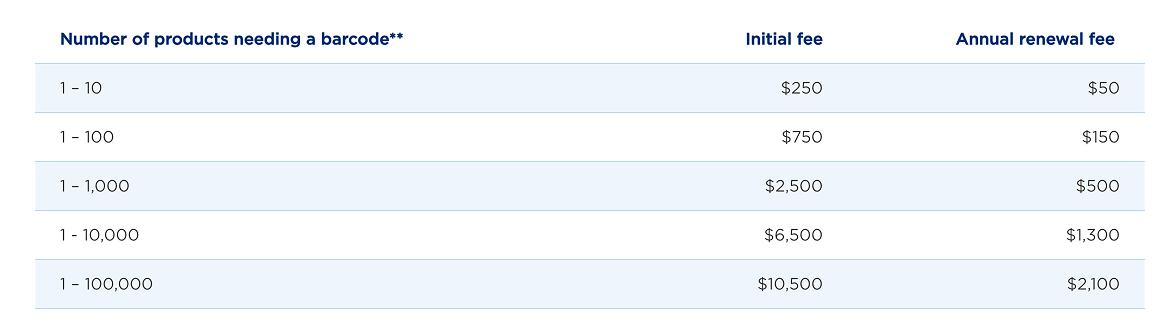
The official GS1 US pricing page lists a single GS1 US GTIN at $30 with no annual renewal fee. For companies that need more barcodes, GS1 Company Prefix pricing starts at $250 initial fee plus $50 annual renewal for 10 items, $750 plus $150 annual renewal for 100 items, and rises from there.
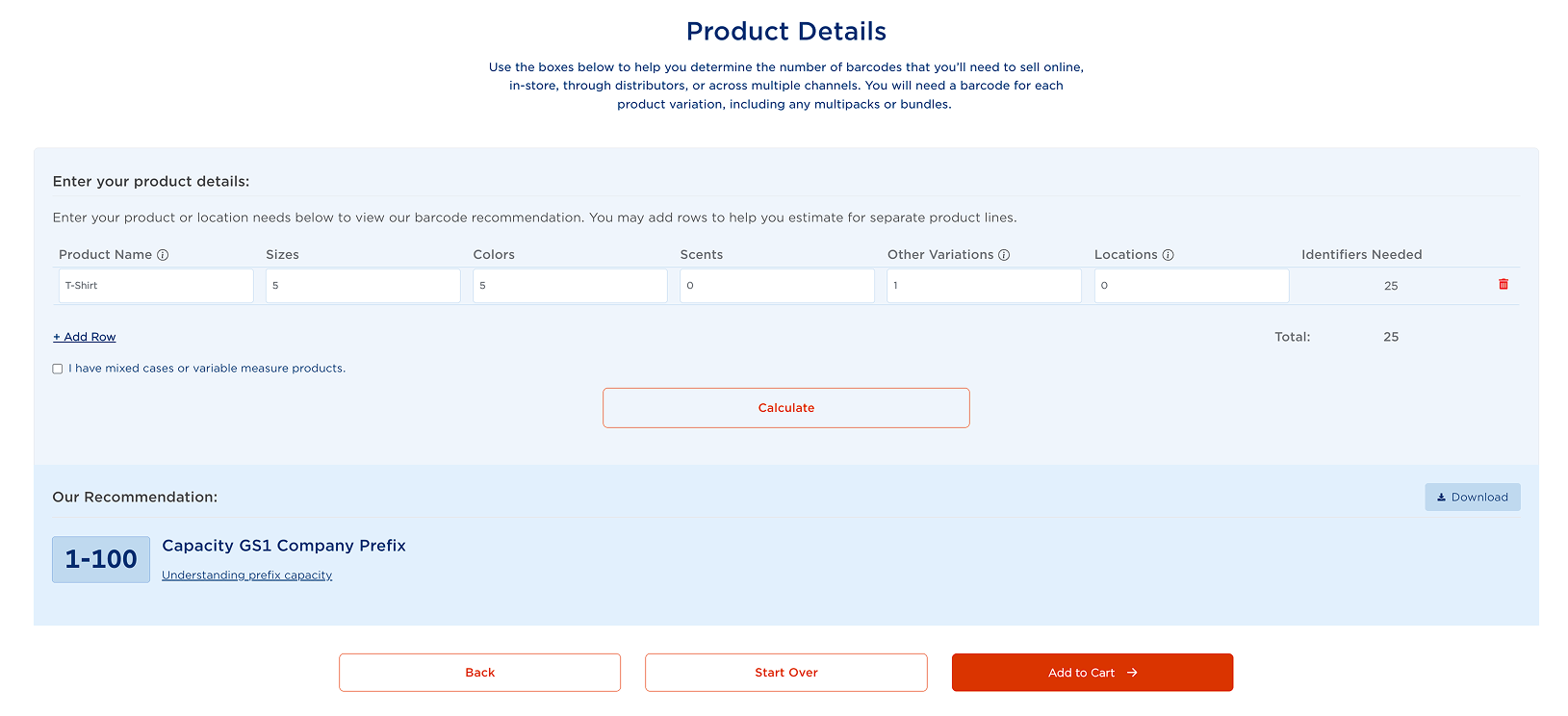
Use the GS1 barcode estimator to calculate how many GTINs you need and what the total cost may look like.
Hidden Cost: Choosing the Wrong Barcode Type Too Early
The hidden cost here is choosing the wrong path too early. If you use free internal barcodes on packaging that later needs to go into retail, you may have to redesign labels, relabel products, and clean up item data. On the other hand, if you only scan stock internally, paying for GS1 barcodes for every SKU may be unnecessary.
In short, barcode numbers can cost anywhere from $0 for internal use to hundreds or thousands of dollars if you need GS1 identifiers for a larger product catalog.
Cost #2: Barcode Scanners - From $0 Phones to Rugged Handhelds
You can start scanning with a smartphone. For low-volume teams, that can be good enough, and it avoids a hardware purchase. But phone cameras are slower and less comfortable when staff scan repeatedly throughout the day.
See how mobile scanning compares to dedicated barcode scanners in terms of speed, performance, and cost-effectiveness: Barcode Scanners vs. Mobile Scanning Apps: Which One Fits Your Business Best?
Scanner pricing can look confusing because “barcode scanner” can mean anything from a simple USB device to a rugged warehouse computer. The right choice depends on how often your team scans, where the scanning happens, and whether employees need access to inventory data while they move.
For the comprehensive overview of the time-tested barcode scanner models, refer to our Best Barcode Scanners for Small Business Inventory Guide.
Lean Setup: USB Barcode Scanner for Fixed Workstations
A lean setup usually means a basic corded barcode scanner connected to a desktop computer, laptop, or POS station through USB.
This is the simplest way to start using barcodes. The scanner acts almost like a keyboard: when someone scans a barcode, the number is entered into the active field in your inventory system. There is very little technical setup, and the hardware cost is low.
This setup works best for small businesses that scan from a fixed location, such as:
- A receiving desk
- A checkout counter
- A packing station
- A small stockroom computer
- A single inventory counting workstation
For example, if your team receives products at one desk, prints labels nearby, and updates inventory from the same computer, a corded scanner may be enough.
The tradeoff is mobility. Employees have to bring items to the scanner or scan only where the computer is located. That can become frustrating if your products are stored across shelves, aisles, bins, trucks, or multiple rooms.
Flexible Setup: Bluetooth Barcode Scanner for Mobile Scanning
A more flexible setup usually means a Bluetooth or wireless barcode scanner that can pair with a computer, tablet, or mobile device.
This gives your team more freedom. Instead of bringing every item to a desk, employees can scan products where the work actually happens: on the shelf, at the receiving area, in a storage room, or during a cycle count.
This setup is a better fit for small businesses that have:
- More SKUs
- More frequent inventory counts
- Products stored across multiple shelves or zones
- Employees who pick, pack, or receive away from a desk
- A need to scan faster without being tied to one workstation
Wireless scanners are still relatively affordable, but they introduce a few extra considerations. You may need to manage battery charging, Bluetooth pairing, scanner range, and occasional connection issues. Some scanners also need a phone, tablet, or computer nearby because they do not run inventory software by themselves.
Advanced Setup: Rugged Mobile Barcode Computers
An advanced mobile setup means using a rugged handheld device with a built-in scanner, screen, operating system, and inventory app access.
These devices are not just scanners. They are mobile computers designed for warehouse, stockroom, field service, manufacturing, or distribution environments. Employees can scan an item and immediately see or update inventory data on the same device.
This type of setup makes sense when barcode scanning is part of daily operations across multiple workflows, such as:
- Receiving purchase orders
- Picking sales orders
- Packing and shipping
- Transferring inventory between locations
- Performing cycle counts
- Tracking serial numbers, lots, or expiration dates
- Managing inventory across a warehouse, van fleet, or multiple stockrooms
The higher price usually comes from durability, speed, battery life, scan range, and the fact that the device can run mobile inventory software directly. Rugged handhelds are built to survive drops, dust, warehouse conditions, and constant use better than standard consumer devices.
For a small business, this level of hardware is usually not necessary on day one. But it becomes easier to justify when employees spend a large part of the day scanning inventory, walking the floor, or updating stock away from a desk.
Cost #3: Barcode Label Printing
Barcode labels are easy to underestimate because each label costs very little. The bigger cost is printing, applying, and maintaining them.
For small teams, standard paper or sticky labels can work whereas for higher-volume labeling a thermal barcode printer is the go-to option.
Overall, a dedicated label printer produces scannable, durable labels faster and more consistently. Label printers can total up to around $100–$300.
The hidden cost is over-labeling. You do not always need a barcode on every individual item. There are three valid strategies, depending on how your inventory moves:
- Label every item when each unit is picked, sold, tracked, or counted individually.
- Label the box, case, or carton when products move in packs or bulk quantities.
- Label the shelf, bin, or rack location when location accuracy matters more than item-level labeling.
This is where software matters. If your system can bulk-generate and print labels directly from product records, printing stays manageable. If your team is building labels one by one in disconnected tools, labor becomes the real expense.
Cost #4: Barcode Inventory Software That Turns Scans Into Stock Updates
A free barcode generator creates an image. It does not know your stock level, reorder point, warehouse location, purchase order, sales order, lot number, or QuickBooks item record.
What Barcode Inventory Software Should Do
That is why software is the core cost of a barcode inventory system for a small business. Barcode inventory software like HandiFox Online starts at $39/month billed annually and helps small businesses:
- Use supplier barcodes, including GS1 barcodes, or generate internal barcodes
- Assign multiple barcodes to one item, including different units of measure
- Generate and print 1D and 2D barcode labels
- Scan products during receiving, cycle counting, transfers, picking, packing, sales, and stock adjustments
- Assign multiple barcodes to one item, such as separate barcodes for different units of measure
- Support barcode-driven workflows for lot- and serial-tracked inventory, where required
Typical Barcode Inventory Software Costs for Small Businesses
A practical SMB benchmark for cloud inventory software in 2026 is roughly $50–$300/month overall, with many per-user tools falling around $75–$150 per user/month depending on features, users, and workflow depth. Discover what SMBs are paying for inventory software in 2026: Cloud Inventory Management Software Cost in 2026: What SMBs Actually Pay
Cost #5: setup, data cleanup, and maintenance
Hardware is easy to price. Setup time is harder, but it is often where the real cost shows up.
Before a barcode inventory app works reliably, your team needs to make sure every barcode points to the right product record. That usually means cleaning up SKUs, removing duplicates, deciding whether to use supplier barcodes or internal barcodes, importing barcode data, printing missing labels, and training employees on when to scan.
For a small catalog, this may be simple. For a larger catalog with inconsistent item names, missing labels, or multiple units of measure, setup can take longer than expected.
The ongoing costs are smaller but still worth planning for:
- new labels and printer supplies
- replacement scanners or batteries
- additional users or devices
- new barcode labels for new SKUs
- process updates as you add locations, sales channels, or workflows
This is also where the ROI comes from. A barcode system should reduce manual entry, shorten counts, prevent picking errors, and make stock levels easier to trust. If your team still scans products and then updates spreadsheets afterward, the system is not saving as much as it should.
Sample Barcode Inventory System Budgets by Business Stage
These sample budgets are meant to give small businesses a practical starting point, not a one-size-fits-all estimate. Your actual cost will depend on SKU count, labeling needs, sales channels, and how deeply you want barcode scanning built into daily inventory workflows.
Test Setup: $0–$300 Upfront
This is for a solo operator, very small stockroom, or low-volume business. You use free internal barcodes, smartphone scanning, basic printed labels, and spreadsheet-based item mapping.
This can work when scan volume is low and inventory mistakes are not yet expensive. But it does not scale well. Free barcode generators are useful for small batches, but they become inefficient once you need bulk label printing, multiple users, or barcode-driven receiving and counting.
Practical Small Business Setup: $800–$1,500 First Year
This is the sweet spot for many growing small businesses. You add inventory software, a dedicated USB or Bluetooth scanner, a label printer, and a clear barcode-to-SKU mapping process.
This setup supports everyday workflows like receiving, counts, sales, and transfers without forcing the team to update spreadsheets after every scan. For many SMBs, this is where barcoding starts paying for itself through fewer picking errors, faster receiving, cleaner counts, and less manual entry.
Warehouse or Multi-Location Setup: $1,500–$5,000+ First Year
This is for businesses with multiple users, multiple locations, higher scan volume, picking and packing workflows, lot/serial tracking, expiration dates, or rugged environments.
Costs rise because you may need multiple scanners, thermal printers, mobile devices, GS1 support, additional users, and more advanced inventory software. This is also where a cheap disconnected setup becomes expensive. If scanning does not sync with inventory, purchasing, sales, accounting, and fulfillment, your team still ends up doing manual cleanup.
How to Choose the Right Barcode Inventory System
For a small business, the real cost of a barcode inventory system is rarely just hardware. The bigger cost drivers are software fit, setup effort, and whether the workflow actually reduces manual work.
Not sure which setup fits your business? HandiFox can help you map your barcode workflow before you buy hardware — from choosing between supplier, internal, and GS1 barcodes to deciding whether your team needs smartphone scanning, Bluetooth scanners, or rugged mobile devices.
Book a demo or start a free trial to see how barcode scanning works inside real inventory workflows.